Send us real moments from your tours. Your phone is all you need. You film the real moments; the social team turns them into posts.
Tour Guide Field Capture Essentials
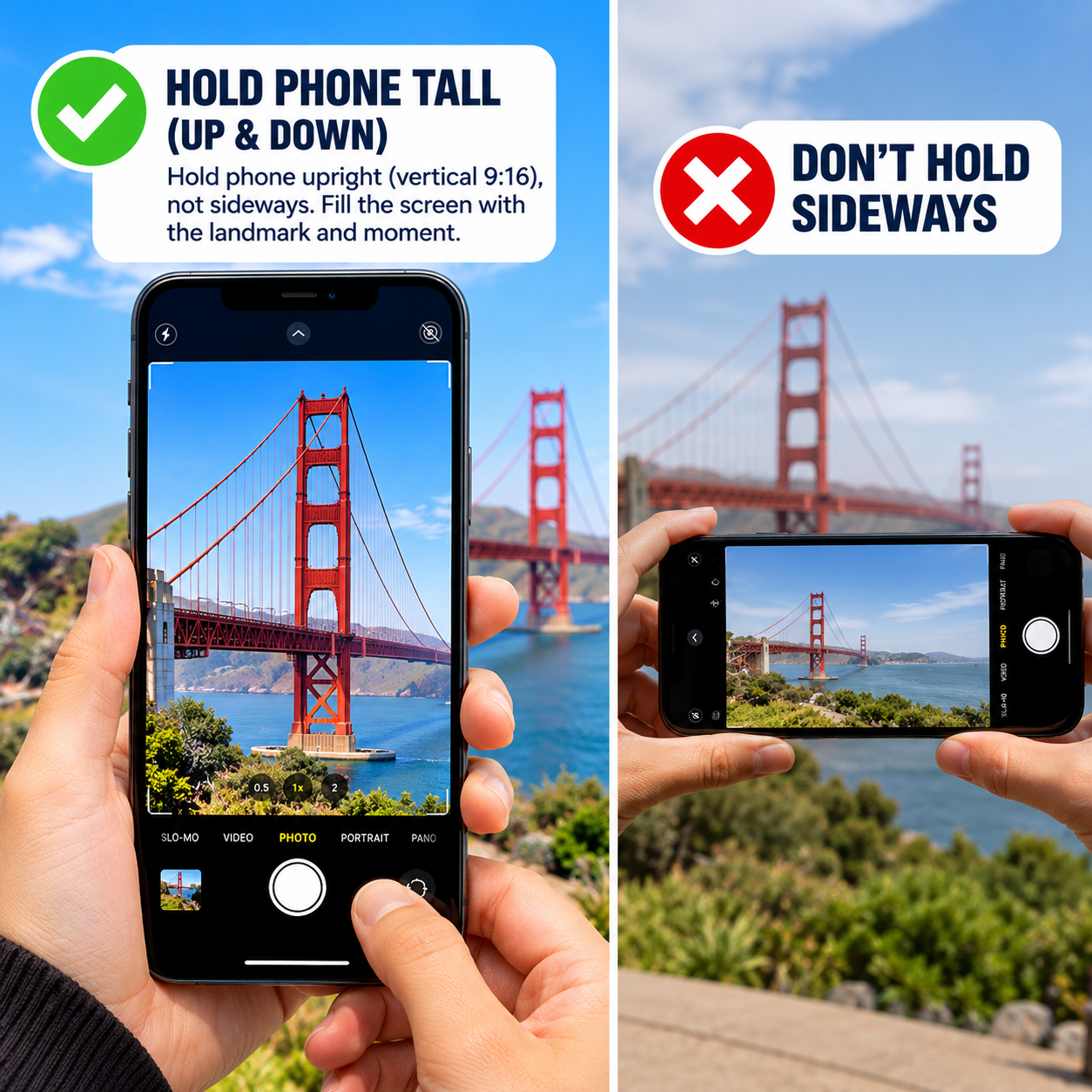
1. Hold Phone Tall (Up & Down)
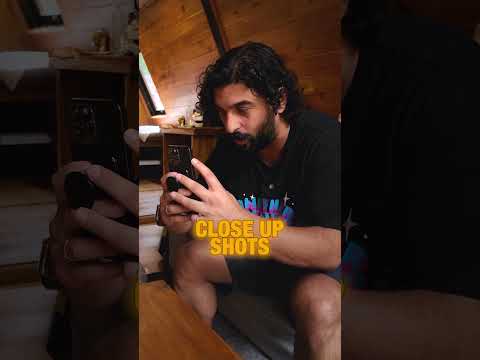
Hold phone upright (vertical 9:16), not sideways. Fill the screen with the landmark and moment.
All our posts are made for phones. If we ever need sideways video for YouTube, we'll ask you first.
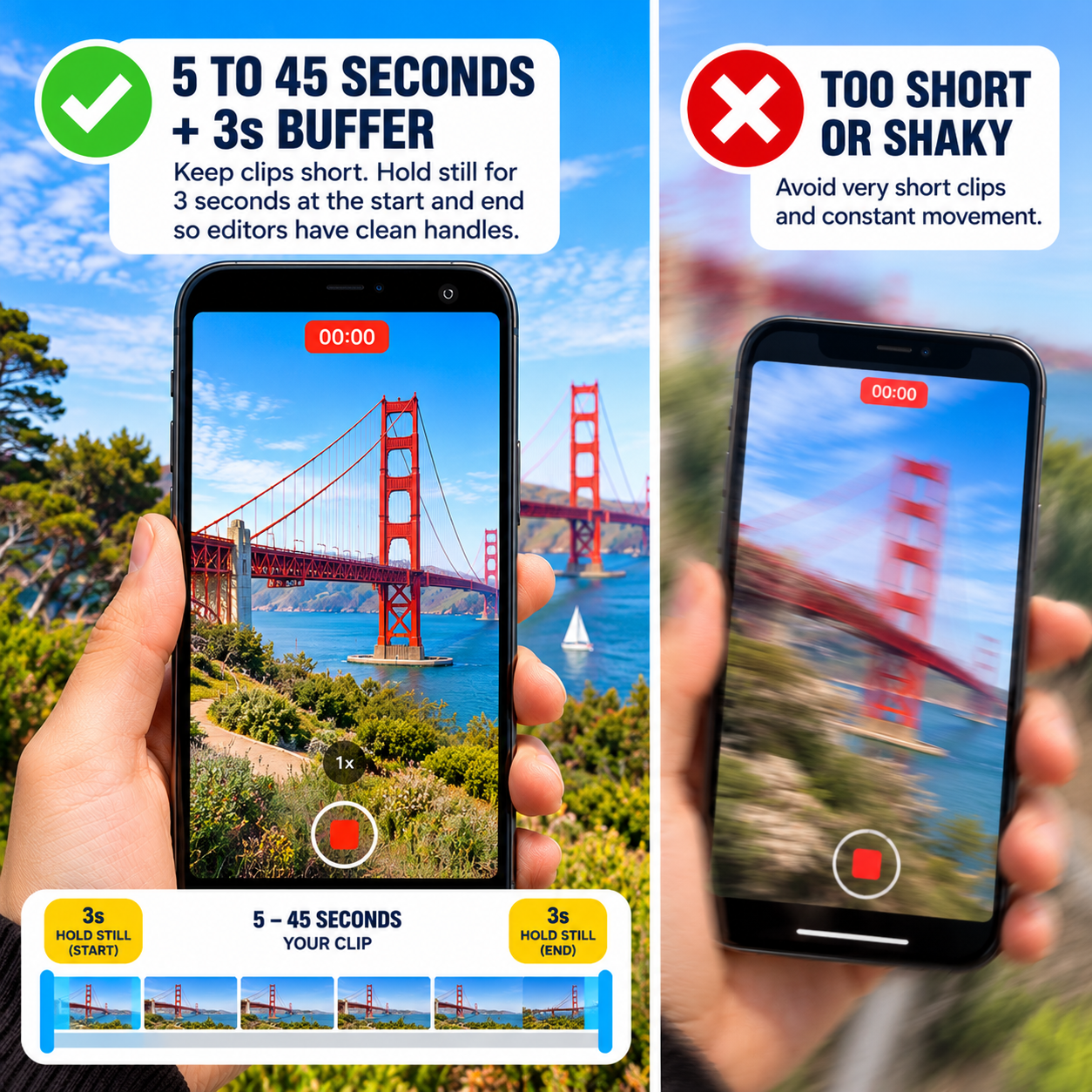
2. 5 to 45s + 3s Buffer
Keep clips short. Hold still for 3 seconds at the start and end so editors have clean handles.
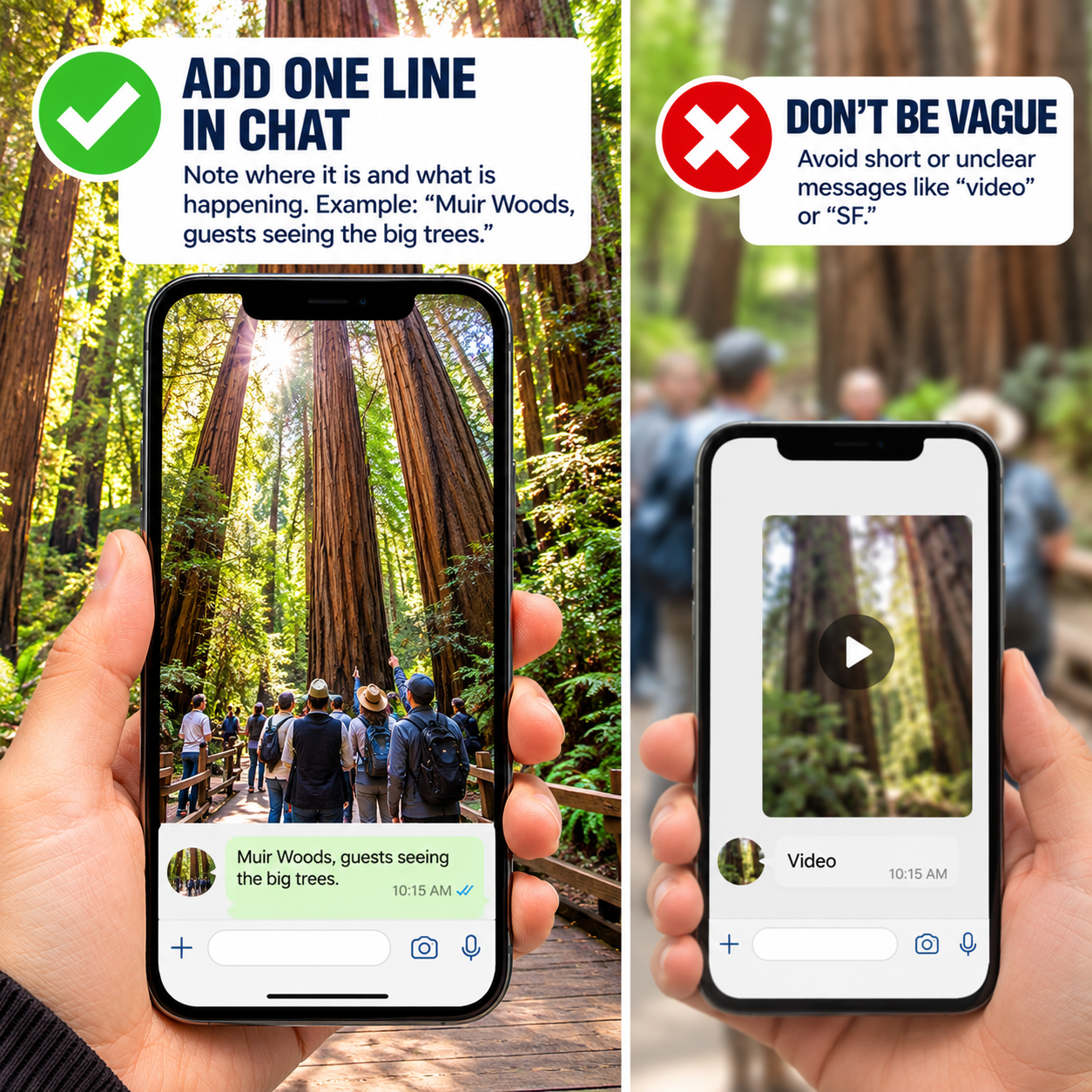
3. Add One Line in Chat
Note where it is and what is happening. Example: "Muir Woods, guests seeing the big trees."
Option 1 · Best MethodZero Compression · Original Quality
Shared Team Archive
Upload Directly to Google Drive
This is the best way to share footage. Clips retain 100% full 4K resolution without compression. The Social Media Team can immediately catalog and edit your files.
Vehicle Parked: Film only when parked safely at designated overlooks.
Patrick and Story Series footage
Send it straight to the Social Media Team. It goes to the front of the queue.
Filming B-roll for a story? (Cris and Aaron)
Check that story's shot list first, then upload to its folder in 24_Story Series.
WHAT HAPPENS TO YOUR CLIPS
Social media posting process: from tour moments to published posts
Social Media Posting ProcessWho moves each file, and which folder it goes to next
1
UploadTour guides & field team
📱
Photos: send them to the WhatsApp Social Media Assets group. Videos: upload through Google Drive or the portal link.
90_RAW UPLOADS
2
OrganizeCris, Jennica & VA team
📂
Review new photos and videos every day and move them into the right location folder (01–24).
01–24 location folders
3
EditJennica (video editor)
🎬
Edit vertical clips, Reels and TikToks, make photo collages and prepare photos. Save approved, finished files here.
91_EDITED READY TO USE
4
Send to UntetheredAaron
📤
Take the finished videos, collages and photos from 91_EDITED READY TO USE and send them to Untethered for scheduling, distribution and ads.
Untethered
5
Publish & archiveMichelle
🗄️
Once the posts are live, move the published files into the archive so nothing gets posted twice.
92_PUBLISHED
Folder flow
90_RAW UPLOADSNew photos and videos from tour guides
→
01–24 location foldersSorted by Cris, Jennica & the VA team
→
91_EDITED READY TO USEFinished videos, collages and photos from Jennica
→
92_PUBLISHEDPublished files, moved here by Michelle
How it works
Purpose
Move raw tour moments into organized folders, turn them into finished posts, deliver them to Untethered, and archive them cleanly without bottlenecks.
Trigger
New uploads from tour guides arriving in WhatsApp or the 90_RAW UPLOADS Drive folder, every day.
Inputs
Raw vertical video clips, tour photos, guest reaction clips and location notes from tour guides.
Step by step
Tour guides put video files in 90_RAW UPLOADS through the portal link or the upload folder, and share photos in the WhatsApp assets group.
Cris, Jennica and the VA team check new files every day, move them out of 90_RAW UPLOADS and file them in the right numbered location folder (01 to 24).
Jennica edits the videos into vertical format, adds the place name on screen, and saves the finished files in 91_EDITED READY TO USE.
Aaron takes the finished files and collages from 91_EDITED READY TO USE and sends them to Untethered.
Michelle confirms the posts are live and moves the files from 91_EDITED READY TO USE to 92_PUBLISHED.
Quality checks
Every file in 91_EDITED READY TO USE has the place name readable on screen and no background radio music. Every link on a published post goes to dylanstours.com, never Viator, GetYourGuide or another booking site.
Exceptions
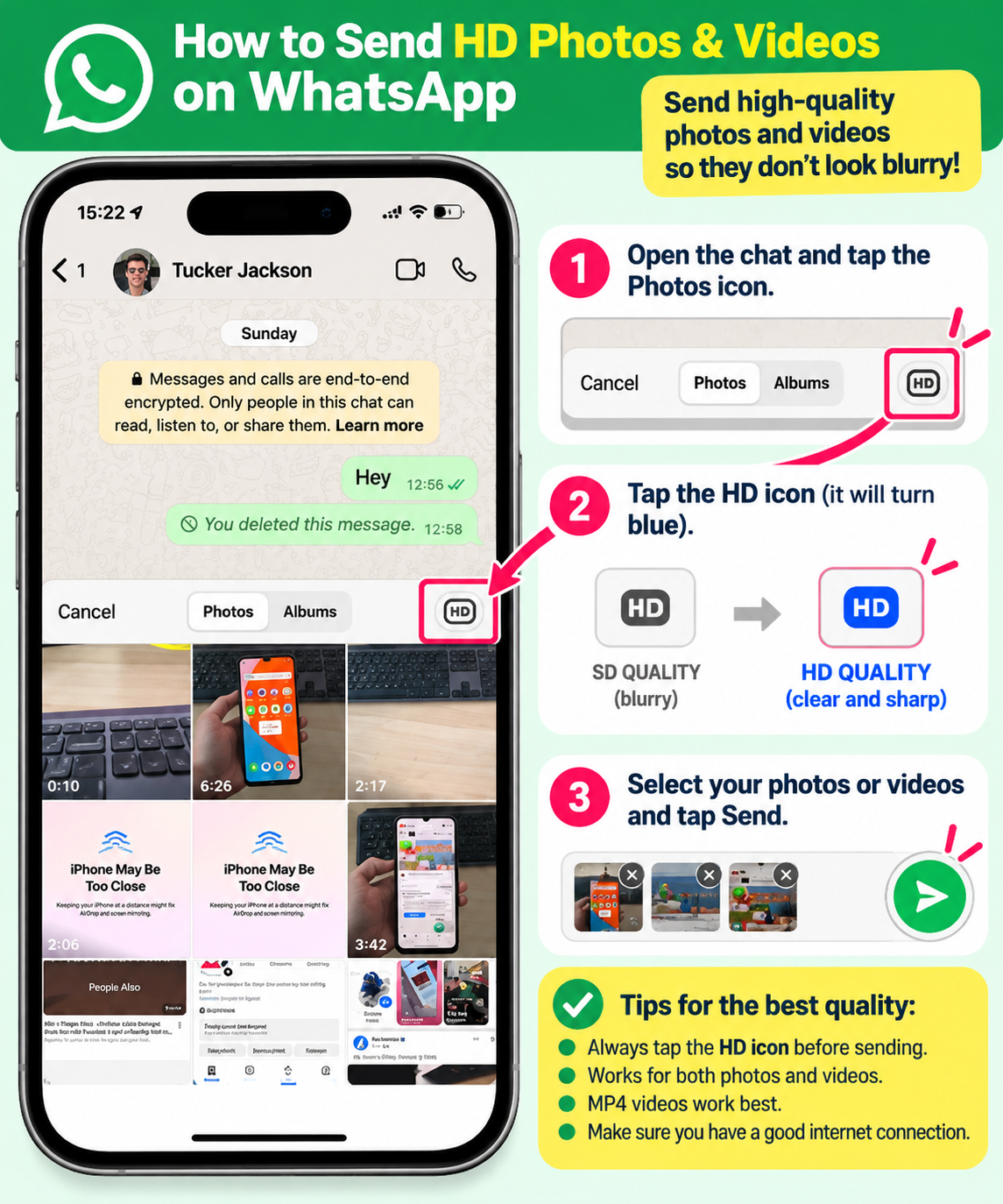
Blurry WhatsApp clip (sent without HD): ask the tour guide to upload the original to Google Drive.
Timely footage (special events, Fleet Week, the Blue Angels): skip the queue and go straight to editing.
What the Social Media Team Creates With Your Clips
01
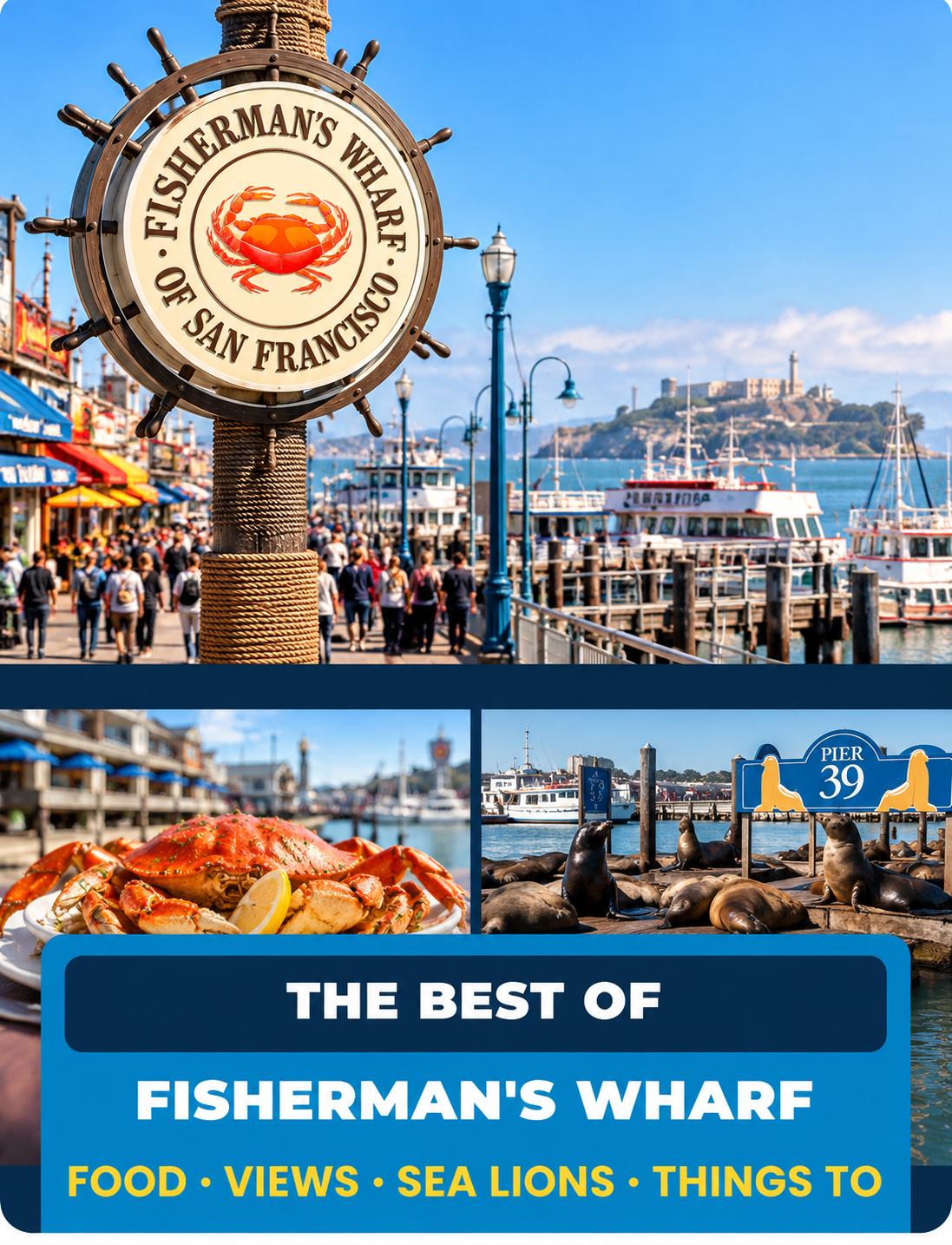
PHOTO COLLAGE POSTLandmark question with 2 to 4 photos.
Why It Works
Answers real traveler queries with clear imagery. High save rate from travelers researching their SF itinerary.
What We Need From You
Send 3 or 4 photos of the same spot from different angles, with nobody blocking the view.
Example Question
"What's the best thing to do at Fisherman's Wharf?"
02
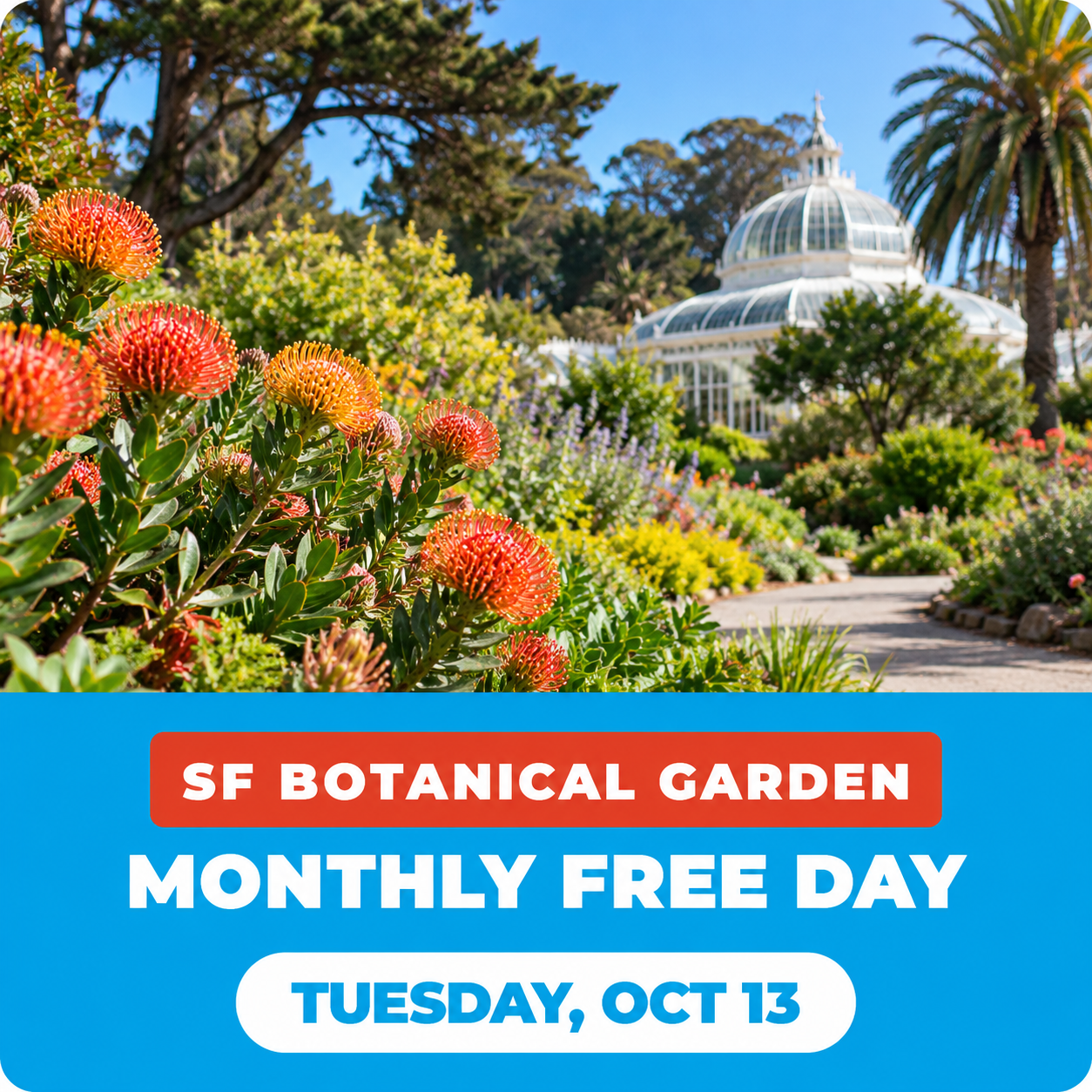
TIMELY POSTWhat is happening in the city this week.
Why It Works
Timely updates build high engagement because travelers in San Francisco this week need real-time info.
What We Need From You
Photos of events as they happen, like the Blue Angels, Halloween at the Wharf, or holiday lights.
Example
"SF Botanical Garden Free Day - Oct 13."
03
SHORT VIDEOPlace name big and readable on screen.
Why It Works
Vertical reels with bold location labels generate viral discovery on TikTok, Reels, and Shorts.
What We Need From You
A clean, steady first 2 seconds of the place, filmed vertical (5–20s duration).
Example Location
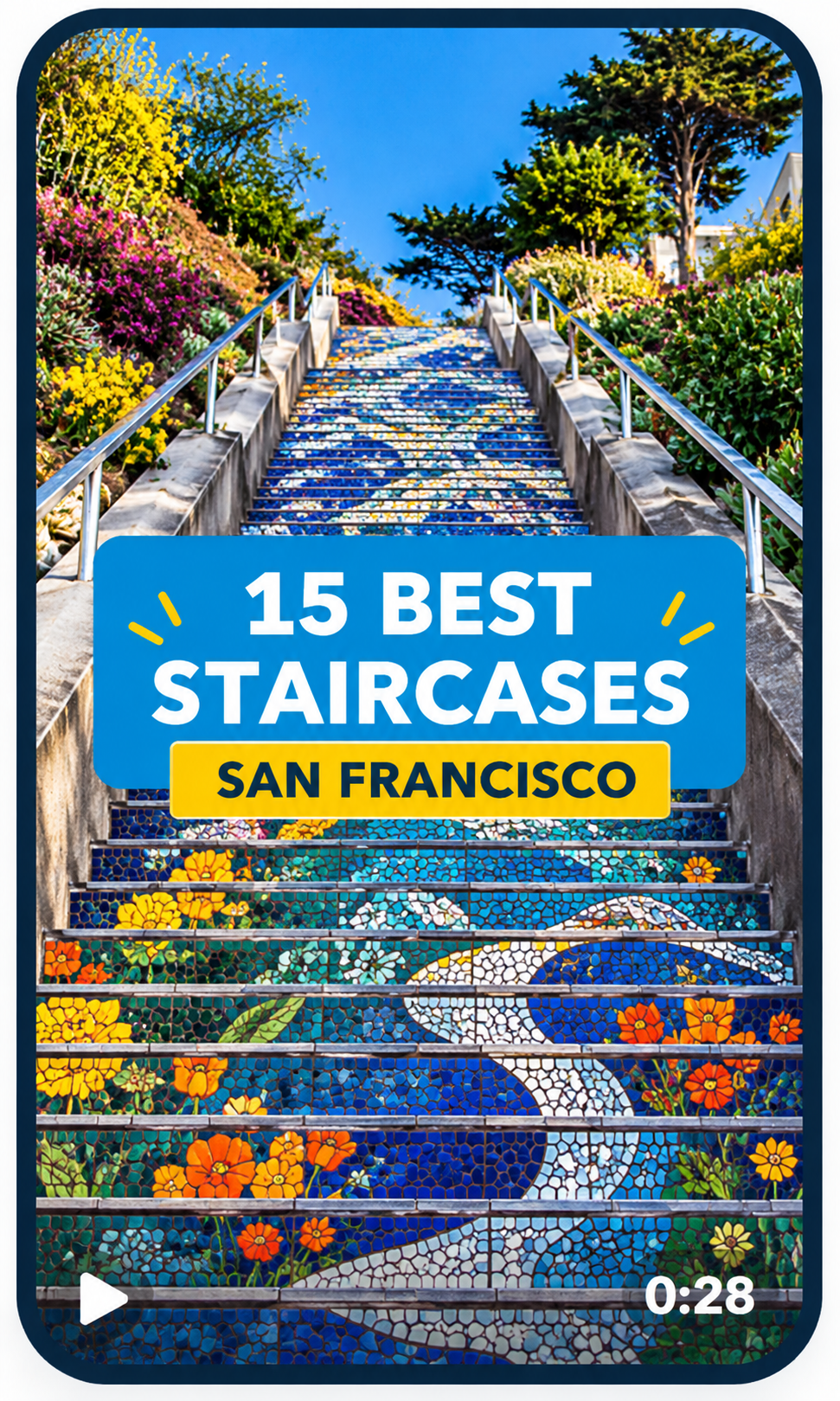
"16th Avenue Tiled Steps - San Francisco."
04
QUESTION POSTSimple text card with answers in comments.
Why It Works
Provocative travel questions spark discussion in comments, prompting algorithms to boost post reach.
What We Need From You
The questions guests ask you most on tour. This format needs no footage! Send via WhatsApp text.
Example Question
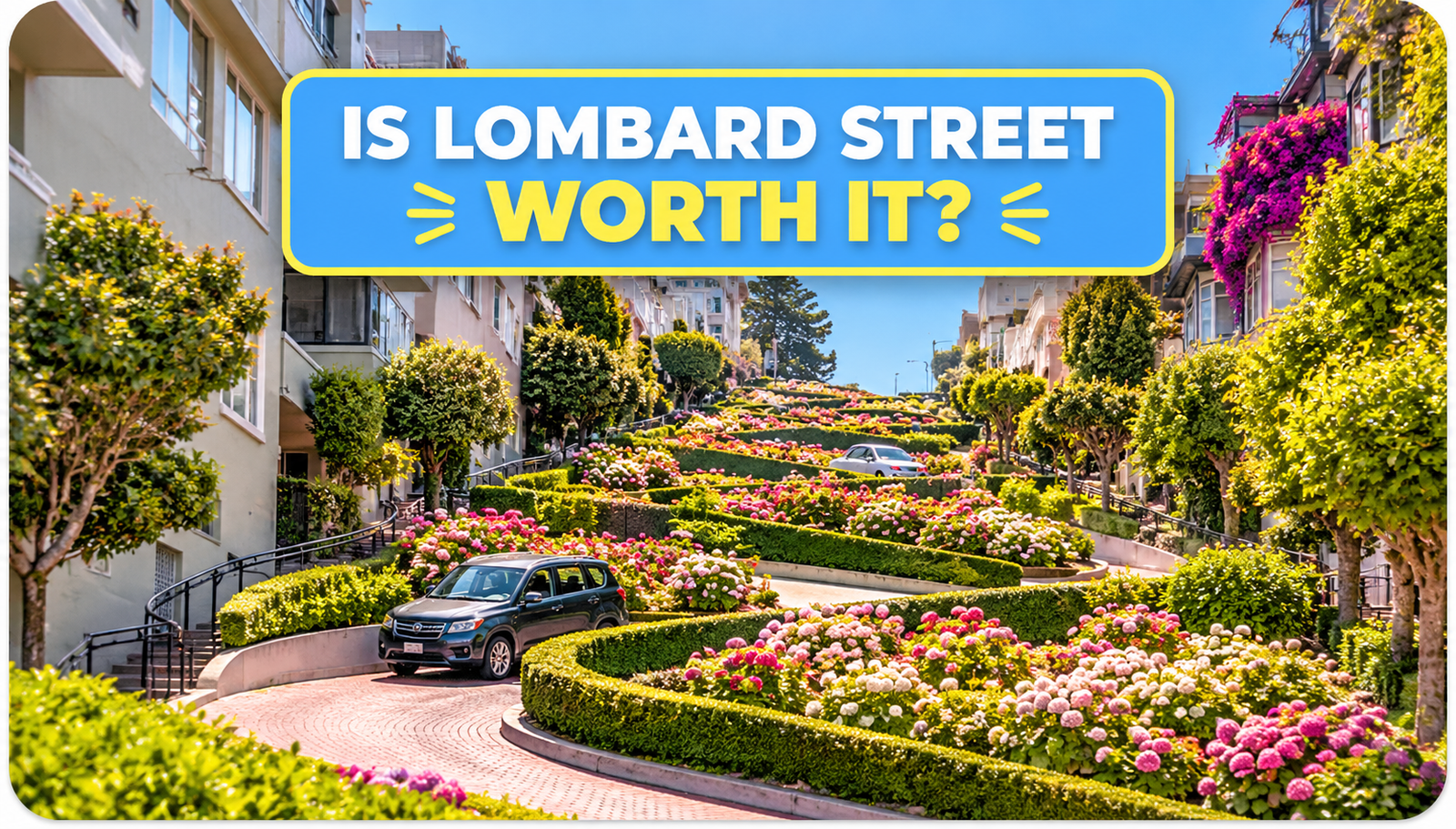
"Is Lombard Street worth it?"
05
GUIDE POSTNeighborhood collage driving blog traffic.
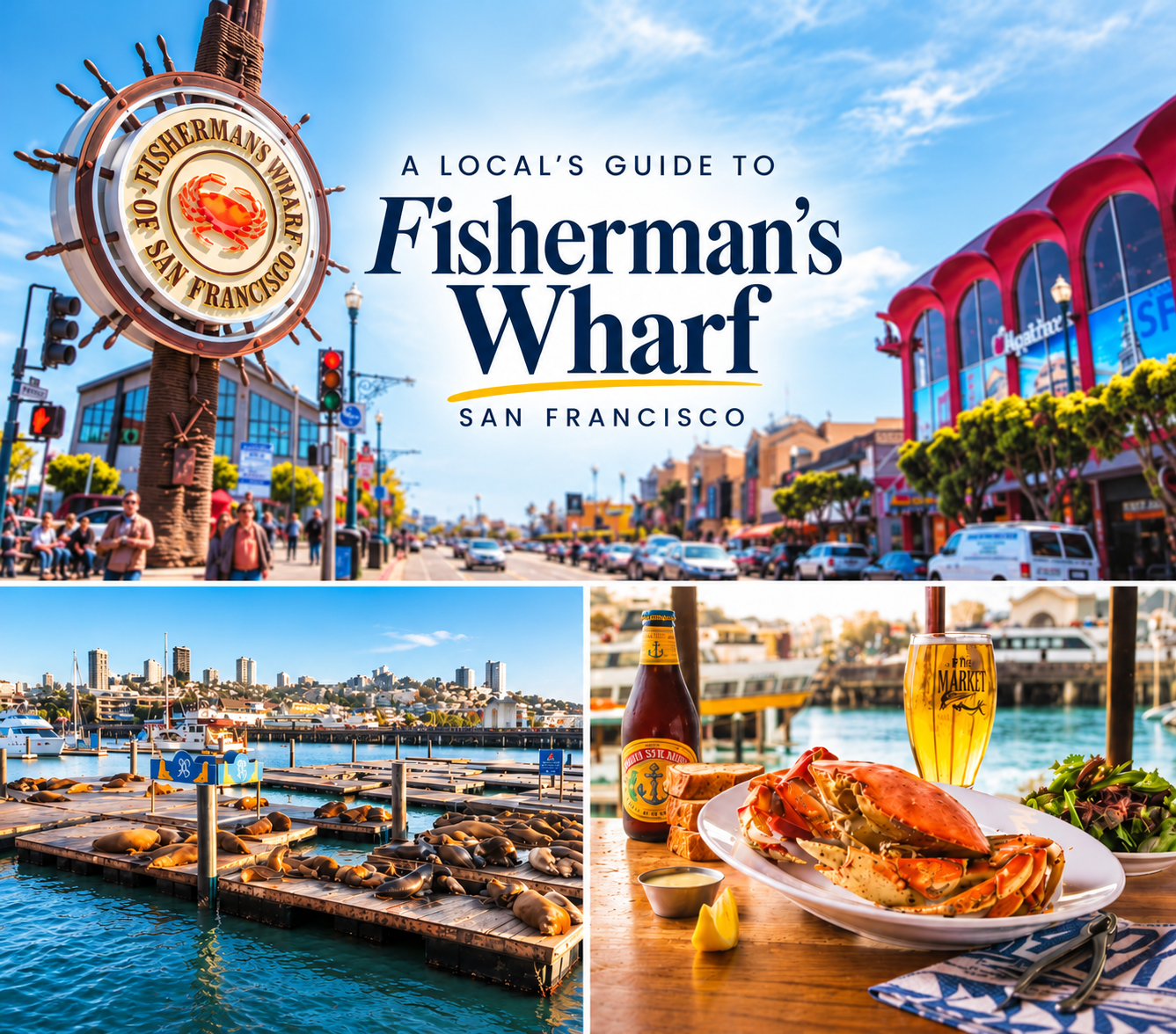
3 or 4 photos of one area (the Wharf sign, the sea lions, the shop street), taken the same day.
Example Location
"Fisherman's Wharf & Mission District Spots."
Overlay Text Options
Examples of how the place name goes on screen, big and easy to read. Tap an image to see it larger.
Fisherman's WharfPier 39Golden Gate Bridge
Short How-To Video Tutorials
Video Guides: Watch & Learn
Start with videos 01 to 05 on how to film and send your clips. The bonus and sample videos are extra ideas for great travel shots. Tap a video to watch it here.
010:17
Film Vertical: Hold Your Phone Tall
Hold your phone up and down, not sideways, so the video fills a phone screen on TikTok, Reels and Shorts.
020:31
Keep Your Clips Steady
Use two hands, keep your elbows close to your body, and hold still for 3 seconds at the start and the end.
031:00
Send on WhatsApp in HD or as a Document
Send clips to the Social Media Assets group without losing quality: pick Document, or tap HD before you send.
040:57
Upload to Google Drive
Open the upload folder on your phone and add your clips in original quality, straight from your gallery.
050:54
Capture Great Guest Moments
Ask guests first, then film real reactions with slow, smooth moves at the big stops.
Bonus: Travel Filming Ideas
06Bonus
How to Shoot Hotel Travel Videos
A quick vertical Short with simple ways to film a place so it looks inviting.
07Bonus
Make Your First Travel Video in 3 Easy Steps
A beginner-friendly walkthrough of three easy steps to plan and film your first travel clips.
08Bonus
Film a Cinematic Travel Video on Your Phone
Tips for smooth, good-looking travel shots using just your phone.
Sample Videos: San Francisco Shorts
Real San Francisco Shorts from other creators. Watch for the ideas: tall video, the place name on screen, quick cuts between stops. We never copy their videos.
Short
Top 10 Must-Visit Attractions in San Francisco
By Danisol
Short
Must-See in San Francisco!
By Kritika Goel
Short
Best Things to Do in San Francisco on Your First Time!
By The Traveller Twins
Short
15 Fun Things to Do in San Francisco
By Marissa Daily
Short
Walking in San Francisco
By Josel
Short
San Francisco Downtown View
By TravelUSA_withme
Dylan's Tours / Internal Playbook
Social Team SOP
Playbook for the Social Media Team | In order of importance. Sections 1 and 6 apply to every single post. Our primary mandate is turning raw guide footage into qualified website sessions and direct checkout bookings on dylanstours.com.
SECTION 1 · FOUNDATIONAL MANDATE
1. The #1 rule: does this answer a guest’s question, or show a place worth seeing?
Most of our guests visit San Francisco once, maybe twice in a lifetime. We are not building repeat customers. We are reaching people while they plan that one trip, and planning a trip means asking questions: Where do I park? Is it worth it? How much time do I need? What's it really like?
A post that answers one of those questions gets found, saved and shared. When that person is ready to book, they book with whoever helped them. A sales post answers nothing and gets scrolled past. This is the most common mistake social media managers and business owners make: selling in the post. Our posts answer the question. The selling happens quietly through the funnel (the comment link, bio link or Story sticker), never in the post itself.
The 2-Question Test (Every post must pass both):
What question does this answer, or which place does it show? If you can't write it in one line, don't post it.
Would a first-time visitor save or share it even if they had never heard of Dylan's Tours? If the only reason to care is that we want them to book, it's a sales post. Rewrite it.
What Dylan wants: content that runs like a machine: video, blogs, posting and engaging every week. Every post has a job: answer a question, show a place, or build trust in our guides. No pretty-but-empty posts. What moves the needle is local knowledge: Patrick's stories and real tour moments, not generic bridge shots.
Write the question first. Before anyone edits, write down the traveler's question (or the place) the post covers. Example: the video “The best $9 you can spend in San Francisco” answers “How much does a cable car ride cost?”
Sales post (don't)
The guest's question
Answer post (do)
"Book our Muir Woods tour today!"
Can I just drive to Muir Woods?
"You can't just drive up to Muir Woods. Here's how parking reservations work, and the easier way in."
"Best San Francisco city tour, book now"
Where's the best Golden Gate Bridge photo?
"3 Golden Gate Bridge photo spots most visitors miss"
"Our new Fisherman's Wharf shop is open, come book a tour!"
Is Fisherman's Wharf worth it?
"Fisherman's Wharf in one morning: what's worth it and what to skip"
"Limited seats, reserve your spot!"
How much can I see in one day?
"One day in SF? Here's what you can realistically see"
A flyer with prices and a logo
What is it actually like?
A guest's real reaction the first time they see the redwoods, with the place name on screen
Answer posts in practice
Muir Woods accessGolden Gate Bridge views1-day SF itineraryGenuine experience vs. ad
Section 1 Execution Rules:
Start every post from a real question. The best sources are the questions guests ask our tour guides on tour, comments and DMs, Google's "People also ask", and TripAdvisor Q&A.
No "book now", prices, discounts or "limited seats" in the caption or on screen.
Answer the question in the post itself. Don't hold the answer back to force a click.
The booking link lives only in the funnel step (first comment, pinned comment, bio, Story sticker), as set out in the Funnels section.
Our guides, vans and the Dylan's Tours name can appear naturally as part of the answer, not as the point of the post.
If a post fails the test, don't post it. Send it back to be reworked, even if it's on schedule.
Story Series pieces (Patrick's blog + video stories) follow the process in the What We’ll Post tab, Story Series section.
SECTION 2 · DISTRIBUTION MATRIX
2. What goes on each platform
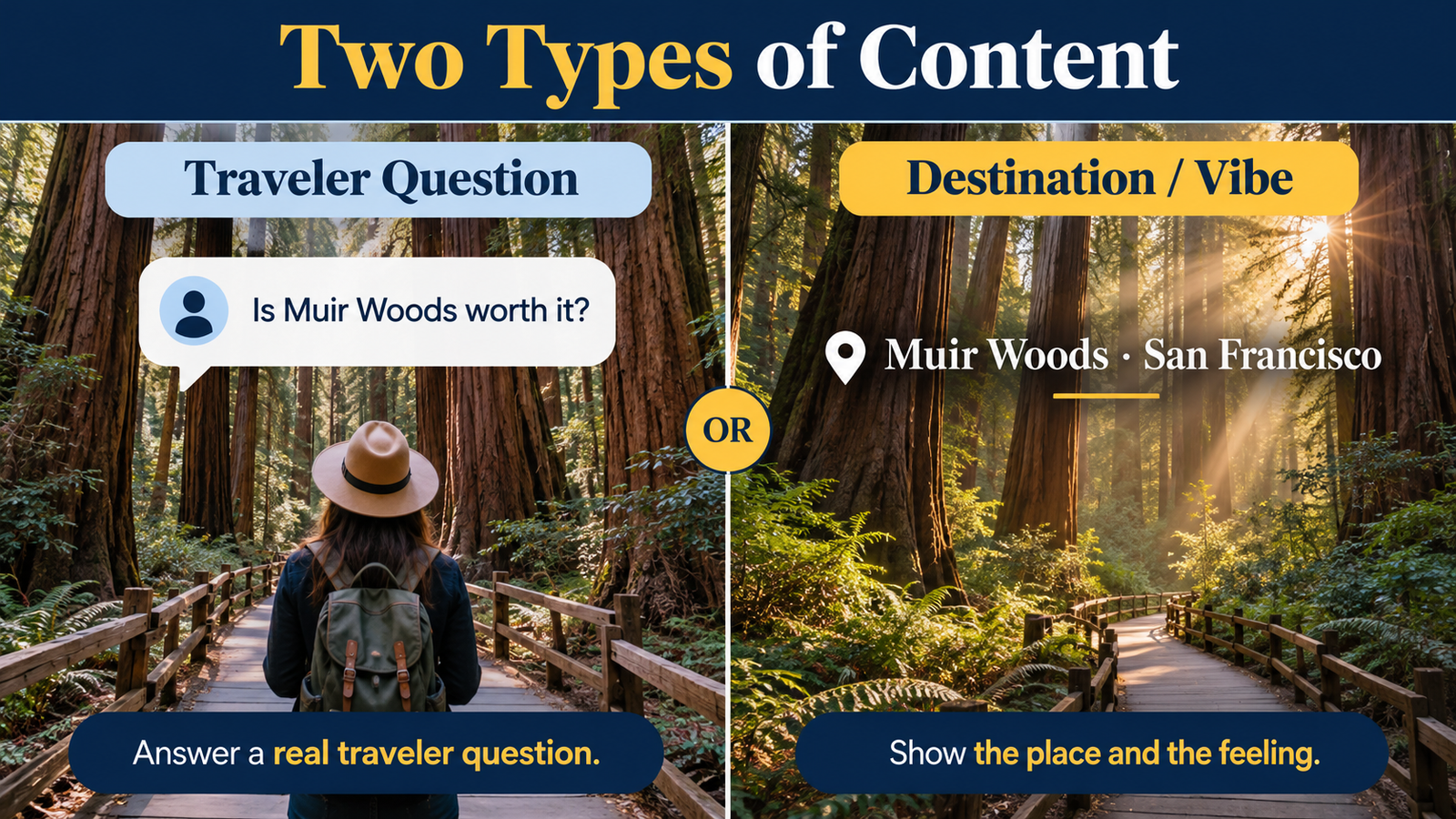
Two content styles: experience-first question and answer (a real traveler question, answered from the tour, no hard sell) and destination or vibe clips (one place, its name on screen, no talking needed).
Platform
Question and answer
Destination or vibe clips
Formats that fit
Links
TikTok
Yes, about 2 of every 3 posts
Yes, about 1 of every 3
3 short video
Not clickable in captions: "link in bio"
Instagram
Yes (Reels and photo carousels)
Yes (Reels)
1, 2, 3 and 4 as a carousel
Not clickable in captions: "link in bio"
Facebook
Yes, this is the main style
Only as Reels shared from Instagram
1, 2, 4 and 5
Clickable: put it in the first comment
YouTube long videos
Yes, full how-to guides
No
Long guides (how to get to Muir Woods, Half Day vs Full Day)
Clickable in the description
YouTube Shorts
Yes
Yes
3 short video, the same clips as TikTok
Link in the channel and description
Platform by platform
TikTokInstagramFacebookYouTube (Shorts + Long)
Two rules for every platform: A vibe clip still shows the place name on screen (plain scenery with no text gets few views), and every link goes to dylanstours.com, never Viator or GetYourGuide.
SECTION 3 · CONVERSION ARCHITECTURE
3. Funnels: how each post leads to our website or a booking
Every post has one next step and one place it sends people. These are the paths we use:
Funnel A · Blog Funnel (Builds SEO)
Example: 15 Best Staircases San Francisco Photo Collage
Photo Collage to Website Article
Collage Hook → Article Link in 1st Comment → dylanstours.com/blog
Photo collage with a title, a one-line caption ("Full list in the comments"), then the first comment links to a full article on dylanstours.com. Each click sends visitors to our site and helps it rank on Google. Best on: Facebook.
A photo collage asks a traveler question ("Where to park for the Golden Gate Bridge?"). The caption says "Answers below". Each answer is its own numbered comment. Comments push the post to more people. Best on: Facebook, Instagram.
Example: Educational Breakdown with Full Guide Links
Question, List in Comments, Then a Link
Funnel B + Funnel A → Tour Transition in Final Comment
Collage or text card asks the question, numbered comments answer it, and the last comment links to the matching blog post or tour page ("Want us to drive you there? Book the Half Day tour: link"). Best on: Facebook.
Example: Narrative Destination Post with Direct Caption Link
Frictionless One-Click Conversion
High-Impact Visual → Editorial Story → Clickable Caption Link
Video or photo with a short caption and the link right in it ("Experience Muir Woods with us: link"). Simplest path, one tap. Best on: Facebook and YouTube descriptions. Not TikTok or Instagram captions, where links can't be clicked.
Video ends with "Tour details in our bio"; the bio link goes to the matching tour page
TikTok, Instagram
Use now
F. Pinned comment
Pin our own comment with the answer and where to find the link, so it's the first thing people read
TikTok, Instagram, YouTube Shorts
Use now
G. Story link sticker
Share the post to Stories with a link sticker to the tour page; save it in a "Plan your trip" Highlight
Instagram, Facebook Stories
Use now
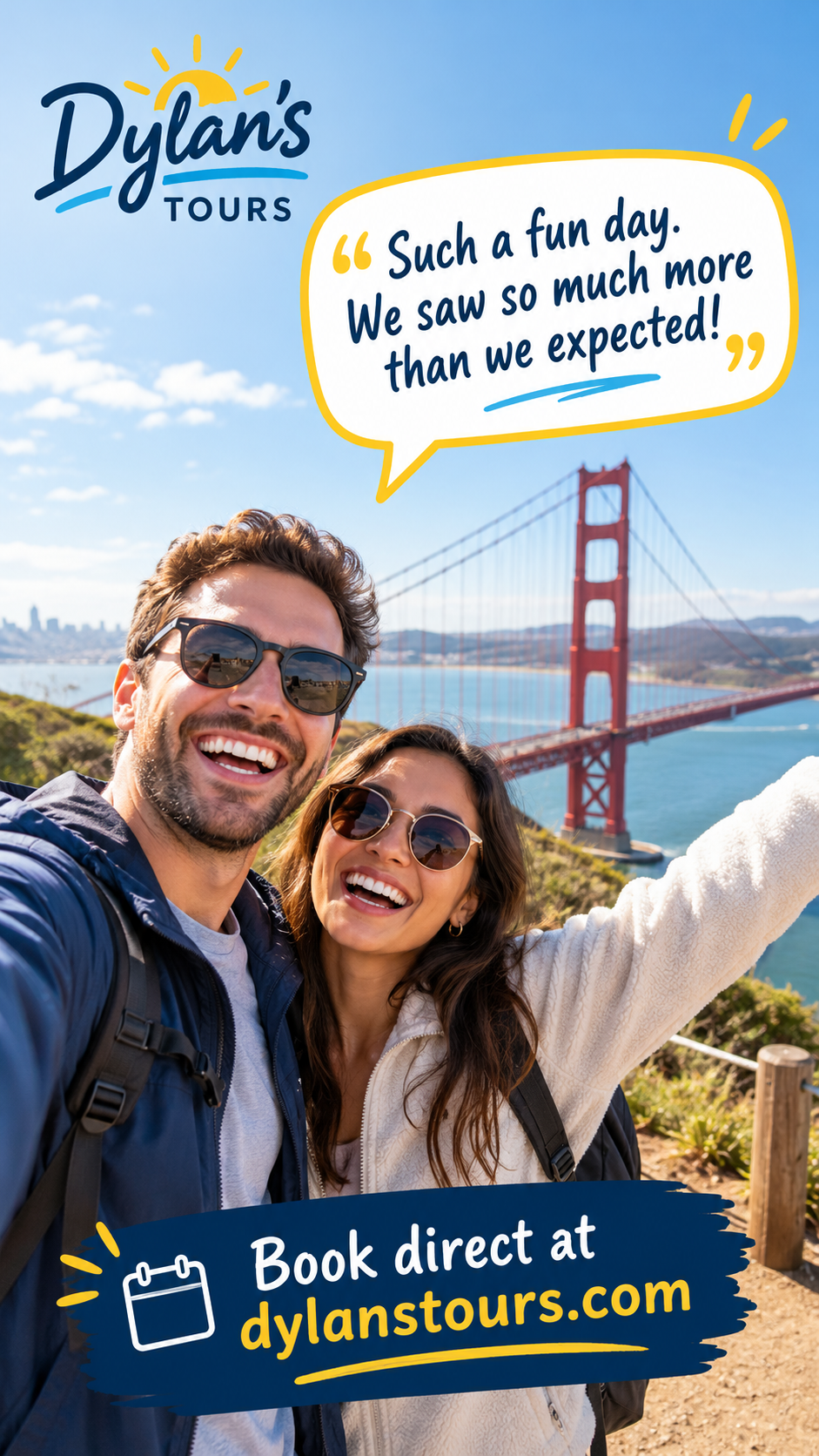
H. Guest review to booking
A guest's real review with their photo (with permission), and "Book direct at dylanstours.com"
Facebook, Instagram
Use now
I. Comment a word, get a DM
"Comment MUIR and we'll send you our Muir Woods guide"; an auto-reply sends the link
Instagram, Facebook
Later: needs account access & auto-reply tool
J. Free trip planner
A free San Francisco planning checklist in exchange for an email, then follow-up emails
All platforms
Later: needs page & email setup on website
E. Link in Bio Use nowF. Pinned Comment Use nowG. Story Link Sticker Use nowH. Guest Review to Booking Use nowI. Comment to DM (Future) LaterJ. Free Trip Planner (Future) Later
Rules for every funnel: One link per post; it always goes to dylanstours.com (or our own blog), never Viator or GetYourGuide; and each link is tagged with the platform and post name (for example ?utm_source=facebook&utm_medium=organic-social&utm_campaign=muir-woods-parking&utm_content=[post-name]) so we can see which posts bring visits and bookings. A blog funnel only goes live once the article is published on our site.
SECTION 4 · ASSET INTAKE & STORAGE
4. Saving footage
Tour guides upload to the Drive folder (90_RAW UPLOADS) or post in the WhatsApp group. Every work day, the Social Media Team checks both and moves useful originals into the correct 01–24 folder; finished edits go in its Final Edit subfolder.
If a clip looks blurry: (WhatsApp shrinks videos sent without HD): ask that guide to resend it with HD on, or upload it to Drive.
Log it: Every video, clip, voice-over or photo is logged in the Hub’s CONTENT PIPELINE → Section A, Submissions the day it arrives, with the question it answers.
Footage requests: Need a clip we don’t have? Check the Asset Library first. If it really isn’t there, add a request in CONTENT PIPELINE → Section B. Include the Idea ID, location, shot, who’s filming (Cris or Aaron) and a due date.
Fast lane: If Patrick or Dylan sends something strong and timely, the Social Media Team flags it Fast lane. Joan decides within 24 hours whether it bumps a planned post. A great video shouldn’t wait weeks for a slot.
SECTION 5 · WORKFLOW
5. How a post moves through the Hub
IDEA BANK or CONTENT PIPELINEWhere the idea or footage comes from
↓
CONTENT TRACKERMade and sent for approval
↓
Approved by Joan
↓
CALENDARScheduled
↓
Posted
Only approved posts go on the CALENDAR.
Hub tab
What it’s for
START HERE
Rules, roles, weekly rhythm
CONTENT TRACKER
Every post and its approval status
CALENDAR
Approved posts only
IDEA BANK
Traveler questions and places, with inspiration link and clip needed
CONTENT PIPELINE
Everything sent in, footage requests, weekly filming time
COLLABS
Creator outreach, from first DM to results
LINKS
Working links
Timesheets
Hours, including minutes per step for Story Series pieces
SECTION 6 · QUALITY GATE
6. Before anything is posted (checklist)
The Social Media Team must verify all 9 items before scheduling or publishing:
0 of 9 checks verified
SECTION 7 · HISTORICAL ARCHIVE & CONTACTS
7. Ideas from what our tour guides have already shared
What was shared
What it could become
Blue Angels over Coit Tower
Timely post: where to watch the Blue Angels from our stops
Fire engine and vintage cars at the Wharf
Short video: what's happening at Fisherman's Wharf this weekend
Boats and the Golden Gate from the Wharf
Place clip: Golden Gate views from Fisherman's Wharf
Cable car photo
Place clip with sound: the cable car bell
Group photos at Muir Woods
Muir Woods in 90 minutes, only if the guests agreed to be posted
Dylan's Instagram story idea
A day on the tour: film each stop in order, from the Wharf sign to Sausalito
Who to ask
Question
Ask
Approval, strategy, how a post will be used
Joan
Story ideas, city history, tour facts, script checks
Patrick
What to film, B-roll, footage from tours
Cris
Filming schedules and locations
Aaron
Seats and availability (including collab tours)
Aaron or Rhona
Paid boosts and ads
Joan, with Dan and Amy
Dylan's Tours / Social Media Plan
What We’ll Post: our social media plan
Dylan’s Tours will use social media to become the most helpful local San Francisco planning brand, so travelers find and trust us before they reach an OTA.
Feed posts, Reels, TikToks, YouTube and Google Business Profile updates answer real visitor questions, show local knowledge and build trust. Stories handle most time-sensitive availability, approved offers, Group invitations and direct-booking links.
Every booking path leads to dylanstours.com, never Viator, GetYourGuide or another OTA. We measure saves, shares, profile visits, website clicks, inquiries and tracked direct bookings, not likes alone.
How this fits the #1 rule: every post either answers a guest’s question or shows a destination with its name on screen (our two kinds of content, explained in the Social Team SOP tab, Section 2). No hard selling in the post unless there’s a clear, approved reason. Stories are where time-sensitive offers, availability and direct booking links live, under the approval rules below.
Our two kinds of content: answer a real traveler question, or show the place and the feeling.
AT A GLANCE · FOR DYLAN AND AARON
At a glance
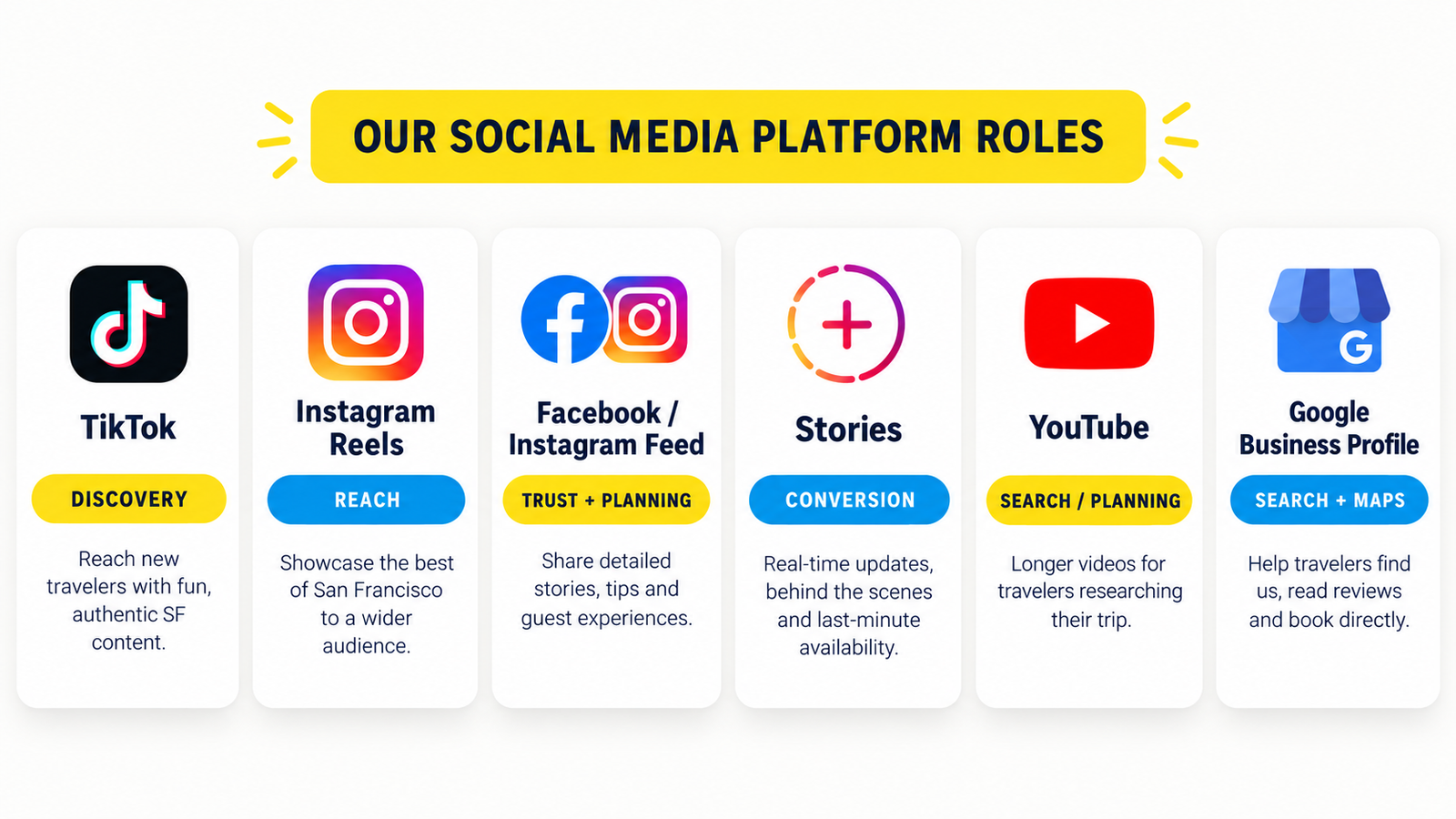
Each platform has one job. The map shows the job; the list below shows what that means for what we post.
Platform & job
What it’s for
What you’ll see
TikTokDiscovery
What it’s forDiscovery: travelers researching San Francisco through short video
What you’ll seeTraveler-question videos and place clips with the name on screen.
Instagram ReelsReach
What it’s forReaching travelers who don’t know us yet
What you’ll seeThe same question videos and place clips, usually repurposed from TikTok.
Facebook & Instagram feedTrust + planning
What it’s forTrust and planning help people save
What you’ll seeItinerary and neighborhood carousels, Muir Woods and Alcatraz planning tips, local history, approved reviews.
StoriesConversion
What it’s forTurning interest into bookings
What you’ll seePolls and questions, verified availability, approved offers, Facebook Group invites, direct booking links.
YouTube (long videos)Search / planning
What it’s forBeing found by travelers searching how to plan their trip
What you’ll seeHow-to planning guides only, such as how to visit Muir Woods or what to see in one day.
YouTube ShortsReach
What it’s forExtra reach from the same vertical clips
What you’ll seeThe same question videos and place clips as TikTok and Reels.
Google Business ProfileSearch + maps
What it’s forShowing up on Google Search and Maps
What you’ll seeThe best feed post each week as an update, with a button to dylanstours.com.
The mix
70%Helpful local content
20%Trust and community
10%Promotion
About 70% helpful local content, 20% trust and community, 10% direct promotion.
Within the helpful 70%: traveler questions lead, then place clips, then guides answering questions, then engagement posts, as set out in the Social Media Playbook.
Every booking link goes to dylanstours.com.
We judge success by bookings and saves, not likes.
WHO DOES WHAT
Who does what
Who
Role
Joan
Strategy, systems, final approval
Patrick
On-camera storyteller for the Story Series; fact-checks scripts and blogs
Cris
Organizes and captures B-roll; about 5 hrs/week filming on tour
Aaron
Filming schedules and locations; about 5 hrs/week filming; may appear on camera; confirms availability
What it is. Patrick tells a short local story on camera. We pair it with a blog on dylanstours.com. Each story answers a question guests ask, or shows a place they’d walk past without knowing its story.
These pieces may not bring bookings right away. They give people a reason to follow us and trust our guides, and to book or recommend us later. They also go on the website so guests get a taste of what they’ll learn on tour.
First test runHoppers Hands (Fort Point, beneath the Golden Gate Bridge). Target: blog and video finished and posted by Tuesday, October 20.
Purpose: work out the format, quality, time per step and who does what, before we produce a larger batch.
Who does what
Role
Responsible
On-camera talent (all talking, studio and on location)
Patrick
Organizing and capturing supporting B-roll and photos
Cris
Scheduling, locations, and appearing on camera when needed
Aaron
May appear on camera
Dylan
Blog first draft (AI-assisted), talking points, process coordination
Joan
Fact-check of story and blog
Patrick
Confirming which tour visits the spot, and whether the stop is guaranteed
Aaron
Editing video, captions, cutting short clips, posting to social
Social Media Team
Uploading the blog to dylanstours.com and embedding the video
To be confirmed
Final approval
Joan, after Patrick’s fact-check and Aaron’s stop check. Dylan only for a new tour, price or claim not already on the website.
The 8 steps for every story
Pick the story. It must answer a guest question or show a place. Note which tour it connects to.
Talking points + blog draft. AI writes the first draft. Then we check every fact and add our own stories and personal touches. Blogs are published under Dylan David’s name.
Shot list for this story. List the B-roll and photos needed for this story only. It isn’t a general shot list; every shot must support the story.
Film. Patrick records. Cris captures B-roll and photos. Use a mic with wind protection outdoors, film vertically, and grab a few landscape photos for the blog.
Store. Upload everything to 24_Story Series in the Social Media Asset Library, one folder per story. Raw footage and photos stay visible in the story folder; finished edits go in its Final Edit subfolder.
Edit. The Social Media Team cuts the 60–90 second vertical video with captions, then 2–3 shorter clips and photo posts from the same footage.
Review. Patrick checks the facts. Aaron confirms the tour stop. Joan approves.
Publish. Blog on dylanstours.com with the video embedded near the top. Video on Instagram, Facebook, TikTok and YouTube Shorts, each pointing to the blog with UTM tags: first comment on Facebook, link in bio plus a pinned comment on Instagram and TikTok, the description on YouTube.
24_Story Series
└── Hoppers Hands
    ├── raw footage and photos (visible immediately)
    └── Final Edit
Track the time. Log the minutes each step takes in the Hub’s Timesheets tab, tagged “Story Series”. The test run sets realistic production goals for the next pieces.
Tour claims rule
Every blog says which tour gives guests the chance to see the spot, and whether that stop is guaranteed. Aaron confirms before publishing. Never imply a stop is scheduled if it isn’t.
What comes next
Once the process works, the team (Dylan, Joan, Patrick, Cris, Aaron and the Social Media Team) sits down to build a 5-month production plan. It covers topics, related tours, filming needs, production deadlines and the publishing schedule. The goal is that 5 months of production gives us a full year of material to publish.
SECTION 1 · THE EVIDENCE
1. Why this plan: what our audit found
Our social media audit (July 2026 numbers, delivered to Dylan on Sep 27) showed strong content instincts but no clear path from a post to a booking. These are signals to guide testing, not permanent truths.
Platform
Followers
Views
Engagements
What stood out
Facebook
4,354
102,716
135
Lots of views, very little engagement; bio said “Book now!” with no link
Instagram
5,716
36,696
397
Our strongest channel; the Linktree in the bio is the working path to booking
TikTok
1,249
10,996
451
“Alcatraz 101” reached 33.1K views, but the bio had no link
What this means for what we post
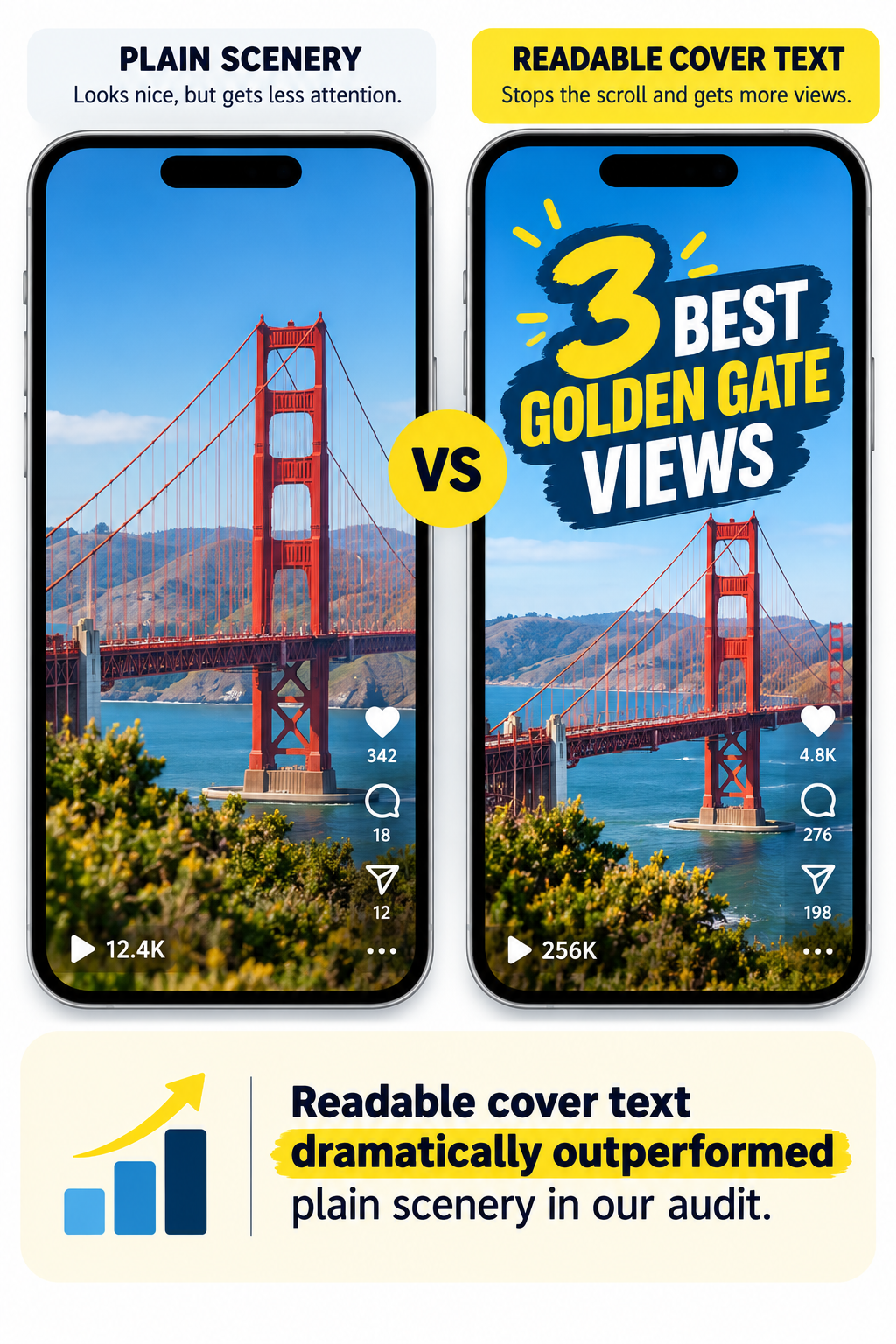
Answer a question, put it on the cover.
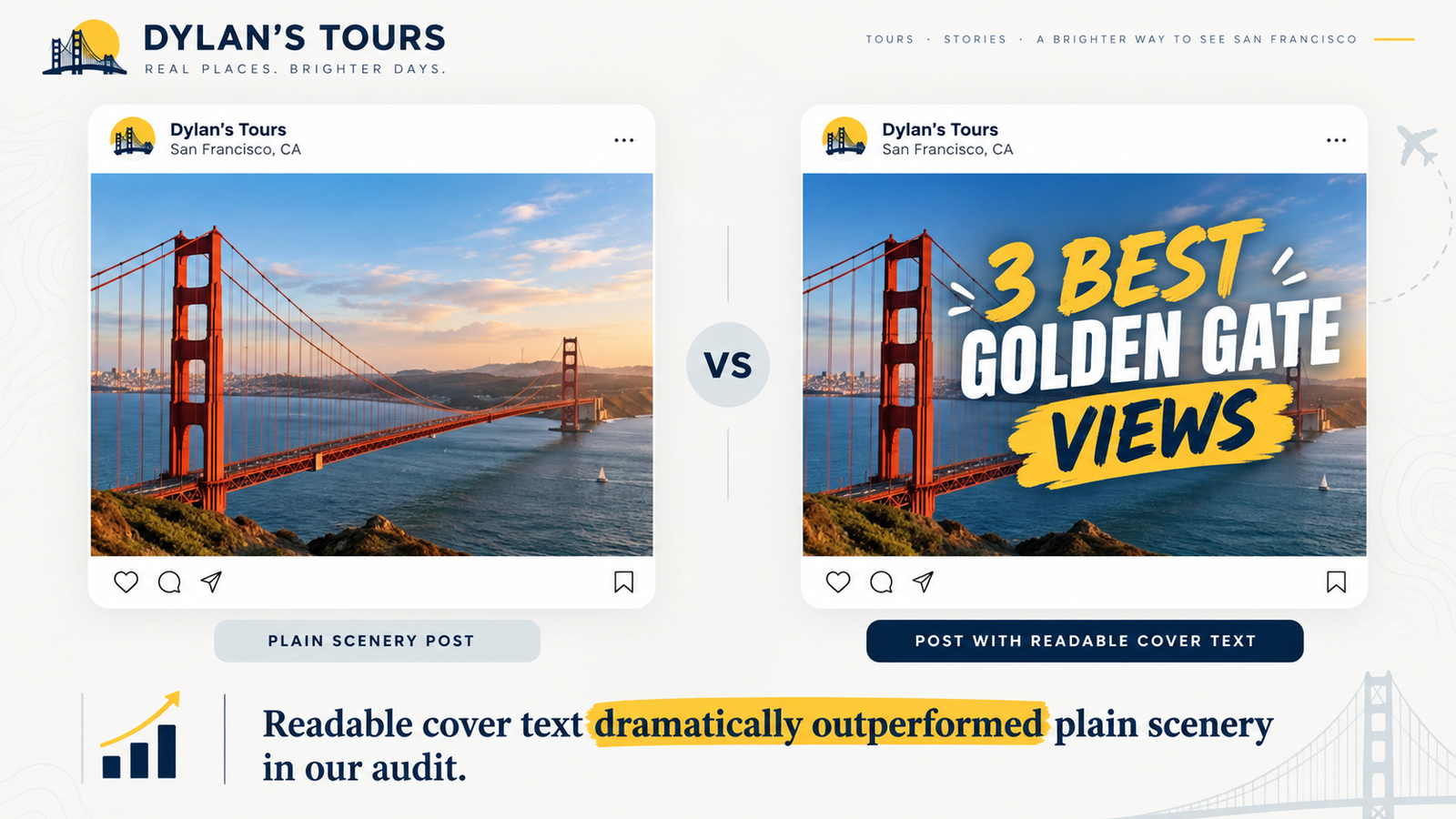
Plain scenery posts got about 100 to 300 views each; videos with readable cover text got roughly 20 to 100 times more. That’s why every post starts from a traveler question with the place name or question on screen.
Story beats product.
Two of Instagram’s top three posts were local history and our origin story, not tour content: the Coit Tower / Lillie Hitchcock Coit post (1,961 views, 21 shares) and the 2003 origin story (1,431 views).
Our guides are the edge.
The “Meet Jeffrey” guide introduction led TikTok and placed third on Instagram. Competitors can film the Golden Gate Bridge; they can’t copy our guides. We put guides on camera answering guest questions.
Video is a promising signal for ads.
In July 2026, Meta Ads video creative generated reported revenue of $13,596 from $1,478 in spend (48 bookings, reported 9.20x return). One carousel test produced nothing. This is a promising signal, not proof that every video beats every carousel, so we keep testing creative by campaign objective and verified booking attribution.
Every profile needs a path to booking.
Views without a link are awareness only. The profile and link checklist below comes before we scale output.
Illustration: readable cover text vs plain scenery.
Who we learned from: Shoreline Sightseeing (staff-fronted recurring series and FAQ highlights per tour), Devour Tours (guides on camera sharing what locals know) and Chicago Architecture Center (one question answered per place). We copy the approach, never their photos or designs.
SECTION 2 · THE SHIFT
2. From scenic posts to helpful, high-trust content
We are not stopping destination videos. We are improving the mix.
Our pages will keep the beauty of San Francisco, and add traveler questions, local tips, guest proof and guide-led posts that build trust and lead to bookings.
What we post on Meta now: mostly scenic destination clips and landmark posts with the site name only, some review content, and some promotional tour posts. In the audit, plain scenery posts got about 100 to 300 views, while posts with a clear question or story on the cover got far more.
Content type
Now
Next
Why it works better
1. Destination / vibe posts
Pretty location videos with the site name only, little context
Keep them, made intentional: place name on screen, best footage, one place per post
Keeps the beauty of SF, gives the feed atmosphere, good for reach
2. Traveler questions
Limited; the takeaway isn’t always clear
Answer real visitor questions, experience-first, no hard sell
Builds trust, earns saves and shares, helps future guests
3. Trip-planning guides
Not enough; more visual than useful
Practical carousels and Reels
Makes Dylan’s the helpful local expert; works well on Meta
4. Guide / local expert posts
Some guide content, not systemized
Guides answering questions on camera, as a regular series
More human, gives the brand personality, hard for competitors to copy
5. Guest experience / social proof
Some reviews and photos, not turned into content
Review-based posts and guest photos, with permission
Shows the real experience; supports bookings without feeling salesy
6. Interactive posts
Limited
Polls, comparisons and “guess the spot” posts
Helps reach, raises engagement naturally, easy to make
7. Soft tour promotion
Sometimes close to direct promotion; too much “book now”
Experience-led, with a subtle tour mention
Feels less like an ad and still supports bookings
8. Story Series (blog + video)
None
Patrick tells a local story, paired with a blog and cut into short clips; mixed in regularly, with the 5-month production plan setting how often
Built for trust and follows, not instant bookings; shows what guests learn on tour
Examples of what’s next
Destination / vibe
“Muir Woods · San Francisco”
“Painted Ladies · SF”
“Golden Gate Bridge · San Francisco”
Traveler questions
“Is Muir Woods worth it?”
“How much time do you need at the Golden Gate Bridge?”
“Can you do Alcatraz and Muir Woods in one day?”
“What should you wear in San Francisco?”
Trip-planning guides
“3 stops for your first day in SF”
“Half-day San Francisco itinerary”
“Best viewpoints in San Francisco”
“Muir Woods vs. Sausalito: what to expect”
Guide / local expert
“A guide’s favorite stop in SF”
“A local guide’s tip for visiting Muir Woods”
“What a tour guide actually recommends in North Beach”
Guest experience
“What our guests loved most this week” (from reviews)
Approved review quotes with a photo of the stop
Interactive
“Muir Woods or Golden Gate sunset?”
“Foggy SF or sunny SF?”
“Guess this San Francisco spot”
“Which SF stop would you choose first?”
Soft tour promotion
“Only one day in SF? Here’s a route we love”
“How we like to experience Muir Woods”
“What a day on the Famous Tour actually looks like”
Story Series
“Hoppers Hands: the tradition beneath the Golden Gate Bridge”
Before and after: two real posts, reworked
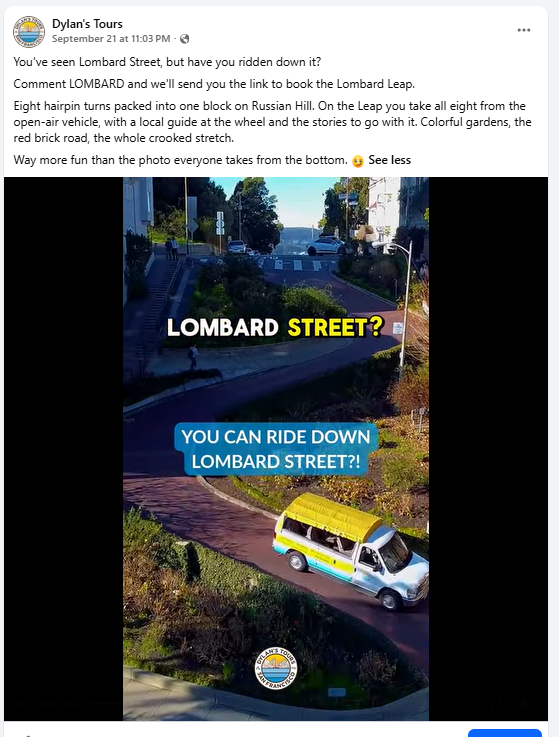
Example 1Walk or Drive Lombard Street?
BeforeThe post as it ran
Before: the post sold first. Line 2 asked people to comment LOMBARD for a booking link, the cover question was ours (“can you ride down it?”), and two text blocks competed on the video.
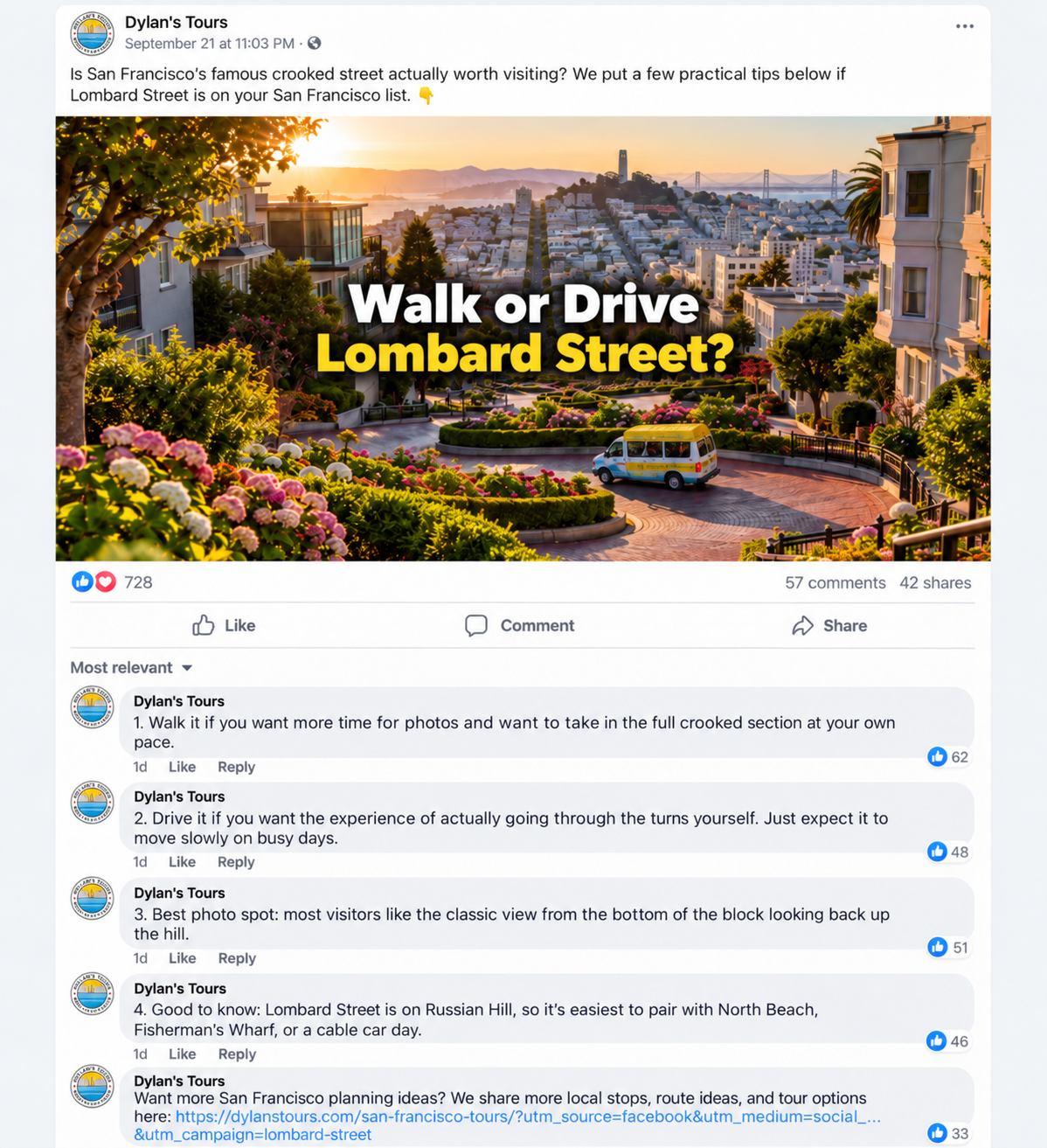
After · Example mockupMockup for illustration. Engagement numbers are not real results.
After: the traveler’s own question goes on the cover, the tips go in numbered comments, and the tour link sits in the last comment.
The numbered comments
1Walk it if you want time for photos at your own pace.
2Drive it if you want to take the turns yourself; it moves slowly on busy days.
3Best photo spot: from the bottom of the block, looking back up the hill.
4Good to know: it’s on Russian Hill, an easy pairing with North Beach, Fisherman’s Wharf or a cable car day.
🔗Last comment: the Lombard Leap link.
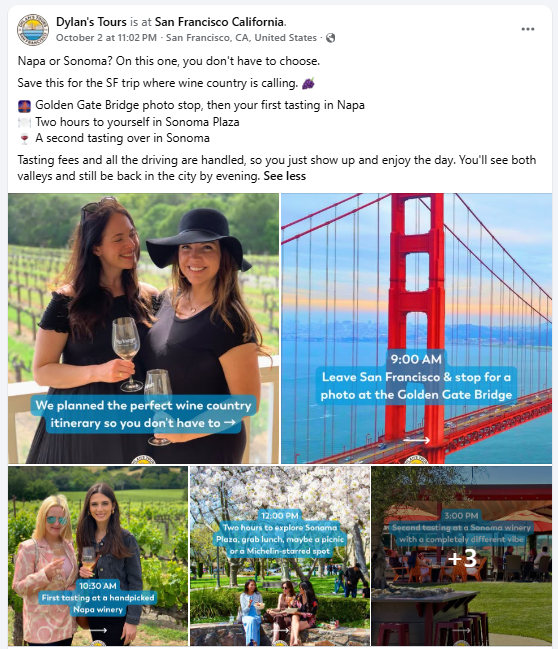
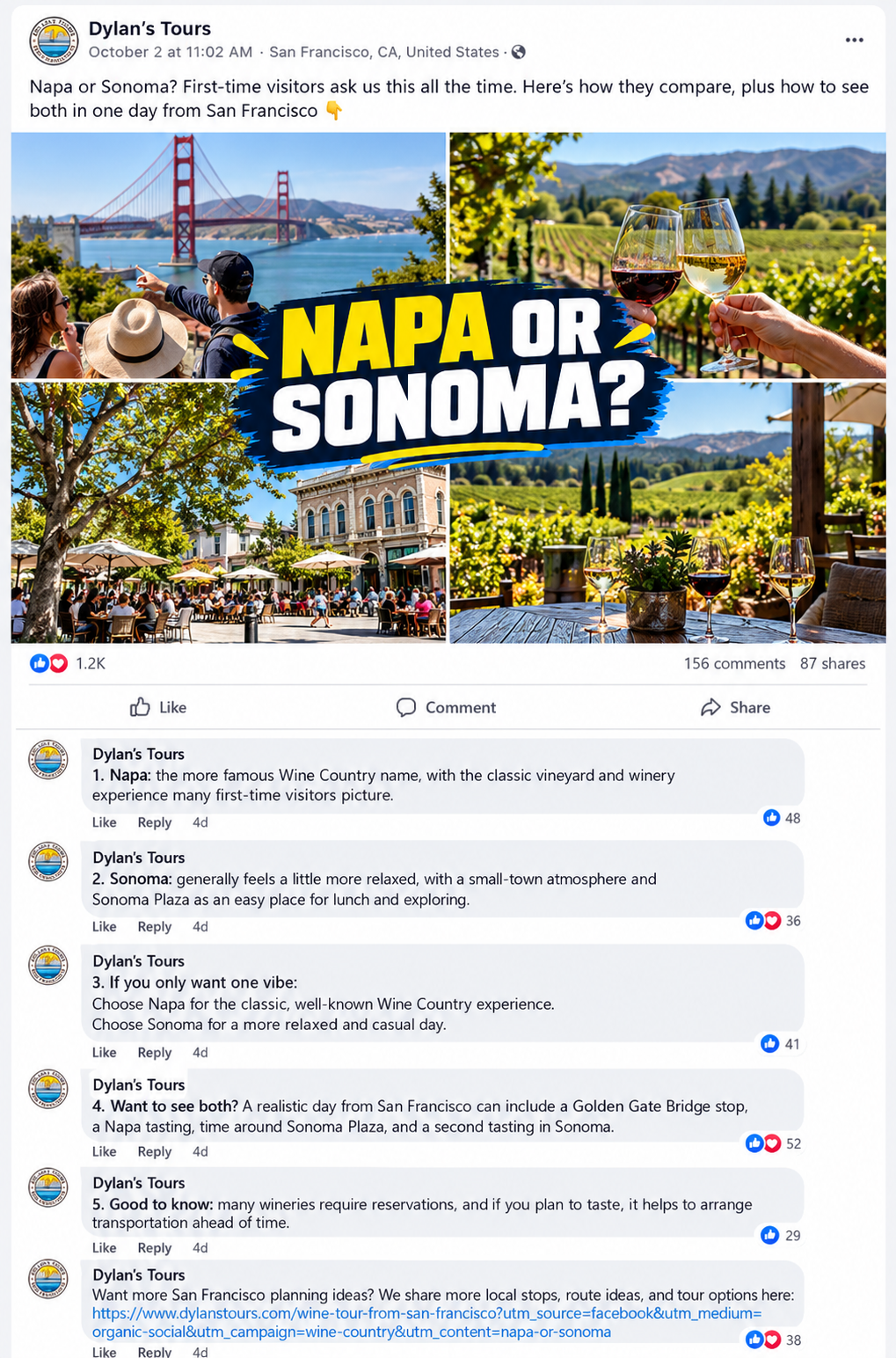
Example 2Napa or Sonoma?
BeforeThe post as it ran
Before: five photos each carried small text, the caption described the tour, and there was no link.
After · Example mockupMockup for illustration. Engagement numbers are not real results.
After: one question in the middle of our real photos, the answers in numbered comments, and the tour link in the last comment.
The numbered comments
1Napa: the famous Wine Country name and the classic vineyard experience.
2Sonoma: more relaxed, with a small-town feel and Sonoma Plaza for lunch.
3If you only want one: Napa for the classic day, Sonoma for a casual one.
4Want both? 9:00 Golden Gate Bridge stop → 10:30 Napa tasting → 12:00 Sonoma Plaza → 3:00 Sonoma tasting → back in SF by evening.
5Good to know: many wineries need reservations; arrange transportation if you’re tasting.
🔗Last comment: “Want both valleys without the driving? Our Wine Country tour does Napa and Sonoma in one day,” plus the link.
The formula (works for both)
Covergrabs attention with the traveler’s question→Captionpromises the value is below→Commentsdeliver the tips→Last commentgives one tagged dylanstours.com link
Guest experience: guest reaction clips and montages wait until the on-camera consent form is ready.
Why this is betterMore saves and shares, more trust, more useful to travelers, stronger local authority, and a better balance of reach and bookings.
SECTION 3 · OUR STARTING POINT
3. What we’ll post from: our Social Media Asset Library
We’re not starting from zero. The shared library already holds real footage, so the first weeks of posts can come from what we have.
Three Drive areas, so nobody confuses them
Drive area
What it is
#Social Media Asset LibraryUse this
The new, organized working library. This is the one we use.
Social Media Content
The legacy Untethered / historical source library
123 Dylan’s Tours Master Folder
Broader company master storage
How the library is organized: by tour, location, subject or experience, in permanent folders numbered 01 to 23 (for example 04_Muir Woods, 06_Golden Gate Bridge, 09_Fisherman’s Wharf), plus 24_Story Series with one folder per story. Legacy creator folders awaiting consolidation: Jeffrey, Jules, Roger, Sean, Barry, Cris and Aaron. These are not active sources; their content is reviewed and moved into the permanent folders.
What’s already there: Golden Gate Bridge (Vista Point, Marin Headlands, the Visitor Center and the bridge walk), Muir Woods, Fisherman’s Wharf, Painted Ladies, Twin Peaks, Sausalito, North Beach and Little Italy, the Mission, Ferry Building, Fort Point, Sutro Baths, Tunnel Tops (Presidio), Golden Gate Park, Cable Car, Wine Country, Fleet Week 2026, Boudin Bakery, plus “Best for Blogs” and “Where to stay in SF” for website and neighborhood posts.
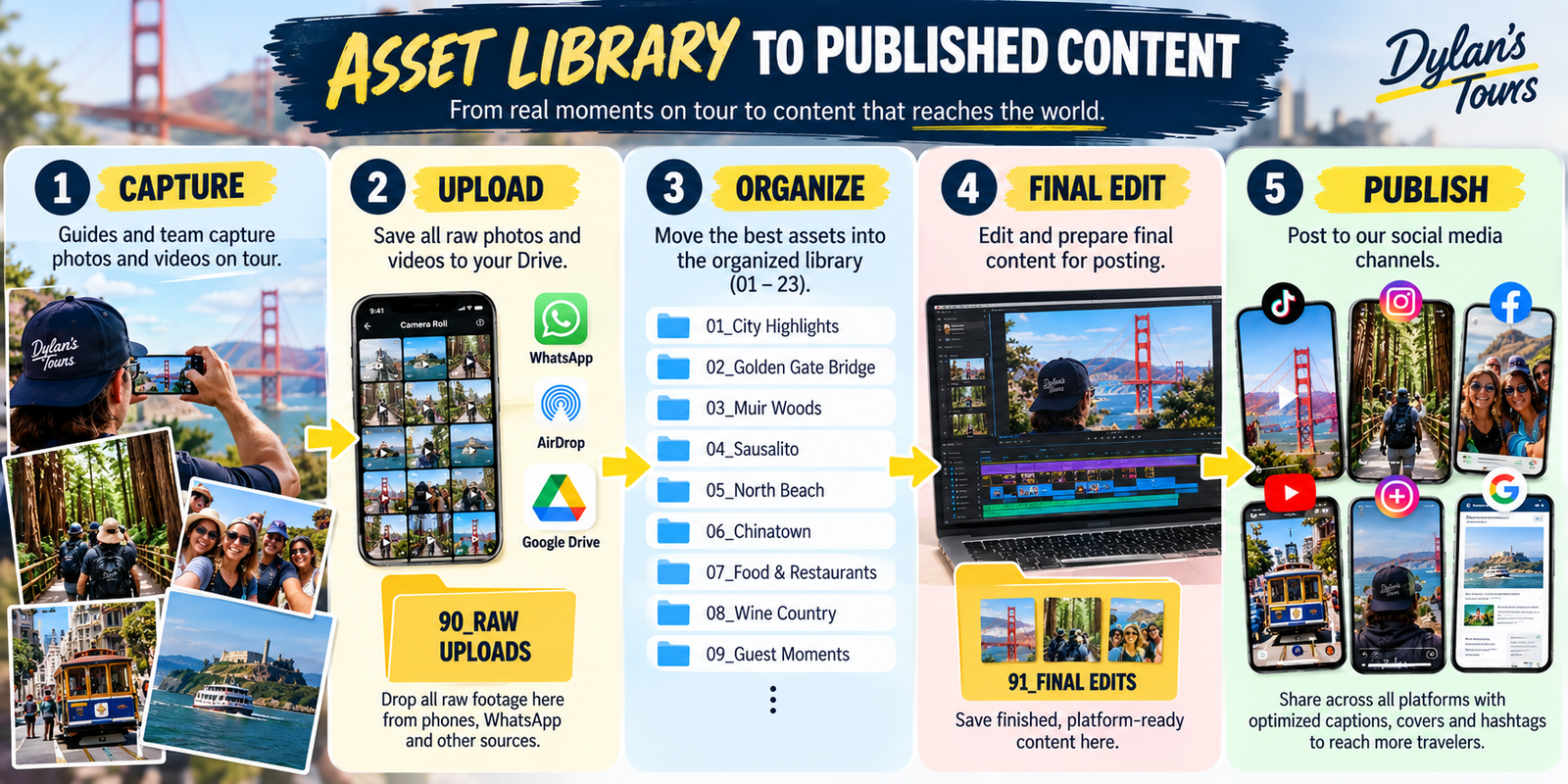
From real moments on tour to published content.
How field content comes in
Preferred: upload originals through the Drive link to 90_RAW UPLOADS for full quality. For a bulk upload, create one new subfolder for the batch.
Fallback: send photos and videos to the Dylan’s Tours WhatsApp content group, and the content team organizes them.
Tour guide rule: no renaming, sorting or editing needed.
How the library flows
Tour guide / team member
↓
Uploads originals to 90_RAW UPLOADS, or sends them to the WhatsApp content group
↓
Content team reviews
↓
Useful originals move into the correct 01–24 permanent folder
↓
Finished edits go into that folder’s Final Edit subfolder
↓
91_EDITED READY TO USEThe publishing queue
↓
92_PUBLISHEDPublishing history and reference, so nothing gets posted twice
About 91: it holds shortcuts or temporary publishing-ready copies only. It is not the permanent home of finished edits; those stay in each folder’s Final Edit subfolder.
Final Edit standard
Every permanent folder follows the same shape:
04_Muir Woods
├── photos and videos (visible immediately)
└── Final Edit
Raw and original assets stay visible in the main folder. Finished edited versions go in the Final Edit subfolder. Don’t create extra layers of subfolders. The one exception is 24_Story Series, which holds one folder per story, each with the same shape.
SECTION 4 · LOOK AND FEEL
4. Visual brand standard and covers
All social content follows the Dylan’s Tours Brand DNA Guide for typography, colors, hierarchy, logo treatment and mobile-safe design. This plan doesn’t repeat it; the essentials:
Headline font: Boston Bold. Supporting font: Poppins.
Blue#009CDE
Yellow#FCDA00
White#FFFFFF
Orange/Red#DC4129
Universal cover rule
Every major Reel, TikTok, Short and carousel cover tells people the topic before they watch. Readable covers were one of the clearest findings in our audit.
3 to 6 words, in Boston Bold
High contrast
One message, one focal image
The place name or the traveler question
Critical text kept away from crop edges
Designed for mobile first
No text over faces, guide expressions or the main landmark, whenever possible
Example: 3 to 6 bold words, one focal image.
SECTION 5 · THE SHORT VERSION
5. Feed, Reels, TikTok and YouTube make people want to follow. Stories make it easy to book.
Feed, Reels, TikTok and YouTube make people want to follow Dylan’s. Stories make it easy for ready travelers to take the next step.
Dylan’s Tours should feel like a trusted local San Francisco guide first, and a tour seller second. Travelers need to trust Dylan’s before they compare us against Viator, GetYourGuide or other OTA listings.
This is not a rigid “sales only go in Stories” rule. An occasional promotional feed post or Reel is fine when the offer is genuinely useful, visually strong, or tied to a real planning need. Just don’t turn the feed into offers.
Content flow
Feed posts, Reels, TikTok, YouTube, Google Business ProfileReach, trust, education, traveler inspiration, proof
↓
StoriesUrgency, interaction, direct booking, links, approved offers, reminders
↓
Website / booking page / Facebook Group / email list
SECTION 6 · DISCOVERY AND REACH
6. Reels
Reels are strongest for reaching people who don’t follow us yet, local visual discovery, fast practical tips, “you didn’t know this about SF” content, guides answering questions, and scenic clips with the place name on screen. Original, native-looking short video from our own team works better than polished, generic ads.
Reel ideas for Dylan’s
“Where should first-time visitors stay in San Francisco?”
“Three things to know before Muir Woods”
“The Alcatraz mistake most visitors make”
“North Beach vs. Fisherman’s Wharf in 30 seconds”
“What a Muir Woods morning actually looks like”
“Would you swim in San Francisco Bay?” (for Take the Plunge)
“A day on the Famous Tour in 20 seconds”
A tour guide answering a guest question or sharing a local fact
“Napa vs. Sonoma: a quick guide for first-timers”
Soft calls to action only
“Save this for your SF trip.”“Comment ‘SF’ if you want the itinerary.”“Follow for local SF planning tips.”“Planning Muir Woods? Check the link in our bio.”
A Reel can sell, but the selling has to come out of the answer. For example: “If you want Muir Woods without figuring out parking and reservations, our local team can help. Details in bio.”
SECTION 7 · TRUST AND PROOF
7. Feed posts: trust, authority, proof and evergreen reference
Feed posts should be useful enough to save or share later. They last longer than Stories, and they are what someone scrolls through on our profile before deciding to book.
Hotel and neighborhood comparison carousels
3-day or 4-day SF itineraries
Muir Woods planning checklists
Alcatraz planning graphics
Local history and origin stories
Approved review quotes and guest photos (with permission)
Local food and hidden-gem recommendations
490 Jefferson Street / Fisherman’s Wharf shop buildout and behind-the-scenes progress (no countdown until the opening date is confirmed)
Seasonal planning advice
Blog articles, where the post itself already gives useful information
SECTION 8 · DIRECT RESPONSE
8. Stories: urgency, conversation and direct response
Stories are temporary, casual and full-screen: the right place for time-limited offers, interactive stickers and website links. Most of our direct conversion activity happens here.
Story ideas for Dylan’s
“Tomorrow’s Muir Woods departure” (only after the availability check below)
“Book direct for [approved benefit]”
Facebook Group invitation
$99 monthly giveaway reminder (only once approved, see below)
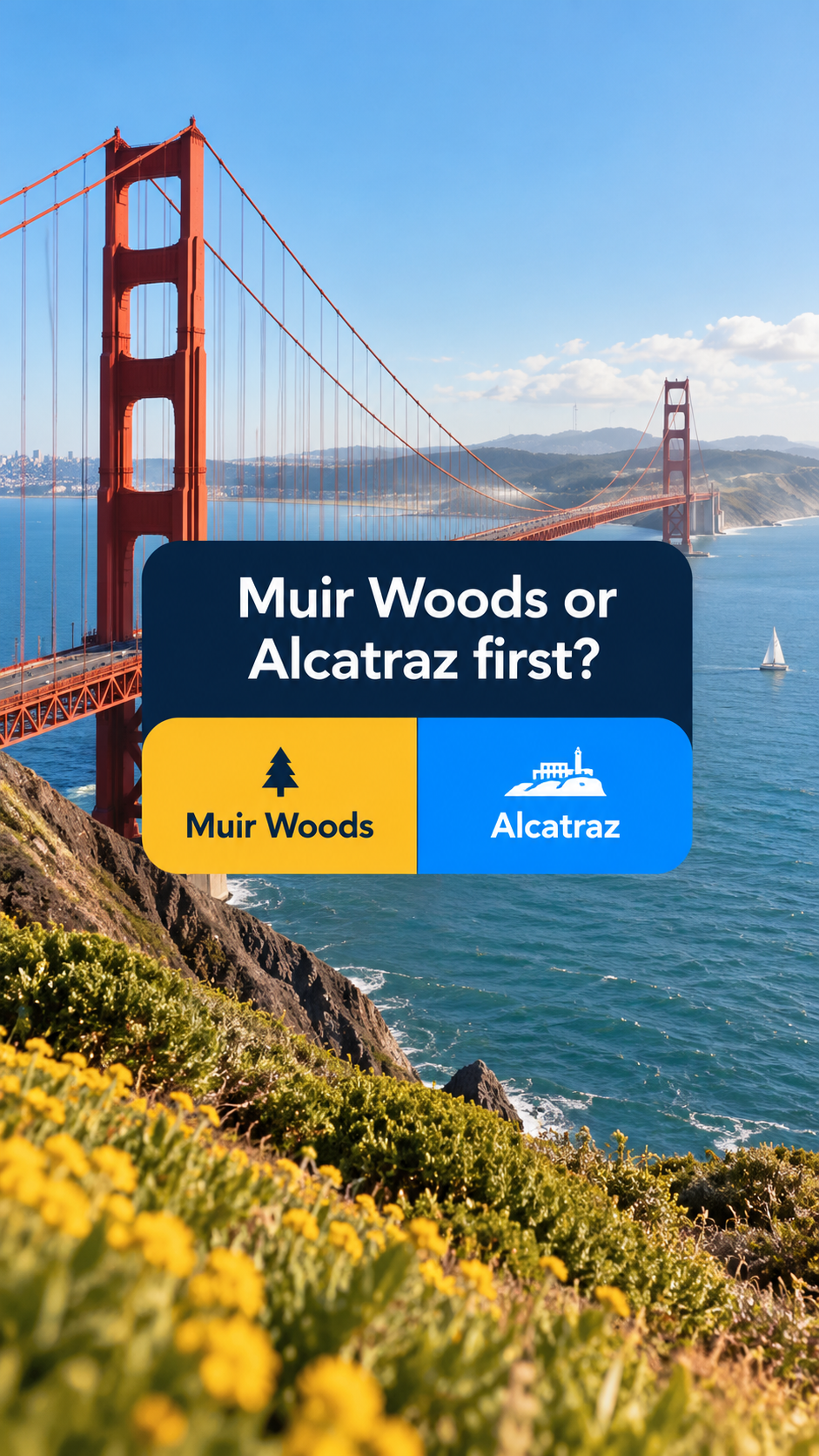
Poll: “Muir Woods or Alcatraz first?”
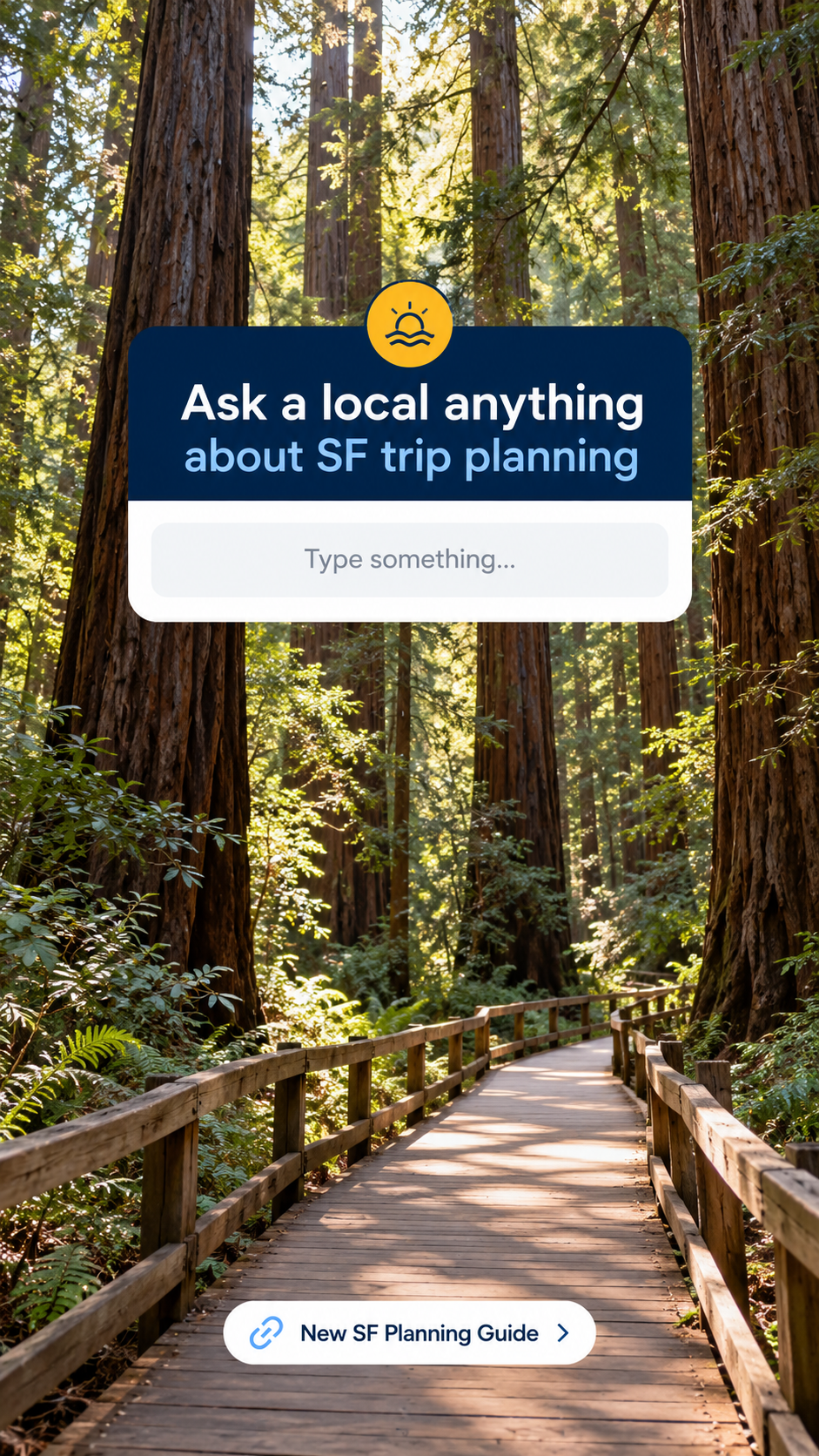
Question box: “Ask a local anything about SF hotels”
Quiz: “Which neighborhood fits your trip?”
Approved guest testimonial
“New SF planning guide is live”
Repost a strong Reel with a booking or Group call to action
Story ideaApproved guest testimonialStory ideaFacebook Group invitation
Availability rule
Only use “limited,” “filling,” “last seats,” “today” or similar urgency language after the current Peek / Ventrata inventory has been checked the same day. If it isn’t confirmed, use neutral wording such as “See upcoming departures” or “Plan your Muir Woods visit.”
$99 giveaway
Publish only after the final package, eligibility, booking restrictions, tracking code, official rules, winner-selection process and Facebook promotion disclaimer are approved.
Stories are not only sales. Aim for this mix:
Story type
Share
Interactive and community
40%
Behind the scenes and personality
30%
Useful planning reminders
20%
Direct offer or verified availability
10%
What each part of the mix looks like
40%Interactive and community30%Behind the scenes and personality20%Useful planning reminder10%Direct offer or verified availability (only after the same-day availability check)
SECTION 9 · DISCOVERY
9. TikTok: a priority discovery channel
TikTok is a priority discovery channel for travelers researching San Francisco through short video. Dylan’s plan puts it at the core. Which audiences it actually converts (age, inquiry quality, booking value) we’ll learn from profile-link traffic, “How did you hear about us?” answers and tracked UTMs, rather than assume.
Proof it works“Alcatraz 101” reached 33.1K views from an account with 1,249 followers. The content travels; it just had nowhere to send people.
Starting mix A test, not a fixed rule
2Traveler-question videos
1Place or vibe clip
Two traveler-question videos for every one place or vibe clip for the first six weeks. Then review watch time, saves, profile visits, site clicks, inquiries and booking signals before locking the mix.
What we’ll post
Question videos: “Alcatraz 101”, “Is Muir Woods worth the trip?”, “How long do you need at the Golden Gate Bridge?”, “Only have a few hours in San Francisco?”
Place clips with the name on screen: “Muir Woods · San Francisco”, sunrise and golden-hour series, “Sounds of San Francisco”
Myth vs. reality: “San Francisco is always cold”
Save-for-your-trip lists: “5 free things to do in San Francisco”
How TikTok leads to a booking
Links in TikTok captions aren’t clickable, so the path is the link in bio to dylanstours.com.
A pinned comment on every video points to the link in bio and names the matching tour.
Comment-keyword DMs come later, once we have the access and a tool.
Rules: the universal cover rule (Section 4), and business-safe music only from TikTok’s commercial library.
SECTION 10 · SEARCH
10. YouTube: long how-to guides and Shorts
YouTube long videos
Q&A only. Planning guides travelers find when they search, and they keep working for months. No vibe clips here.
“How to visit Muir Woods: parking reservations, the shuttle, or a tour”
“One day in San Francisco: what you can realistically see”
“How to plan your Alcatraz visit”
“Where to stay in San Francisco: neighborhoods compared”
“Napa vs. Sonoma: a first-timer’s guide”
YouTube Shorts
Both Q&A and vibe clips. The same vertical videos as TikTok and Reels. Where a long guide exists, the Short points to it.
How long videos lead to a booking
The title is the exact question travelers search for.
The link in the description goes to the matching dylanstours.com page, with a UTM tag.
A pinned comment repeats the link, and the channel’s About section links to the website.
Each long video is also embedded in the matching blog article on our website.
Long videos are filmed sideways (landscape). The social team asks a specific tour guide for the stops it needs.
SECTION 11 · GOOGLE
11. Google Business Profile: the same posts, found on Google
Travelers searching “Muir Woods tour” or “tours near me” on Google Search and Maps see our Google Business Profile before our social pages. It takes almost no extra work: the best feed post each week gets reposted here.
Repost: photo and Q&A posts rewritten as a short update with the answer in the text; timely posts (Fleet Week, free days, holiday events); short videos where the profile accepts them; aim for 3 to 5 fresh photos of our stops in active weeks, when we have genuinely good new material (never weak or repeat photos just to hit a number).
Don’t repost: Stories-style urgency, polls or people-only posts.
Path to booking: every post gets a “Learn more” or “Book” button to the matching dylanstours.com page, tagged with the UTM convention in Section 18.
Reviews: new Google reviews get a reply; strong ones can become social proof posts with the guest’s OK.
Example updates: our stops, named on the image
Fisherman’s WharfPier 39Golden Gate Bridge
Address control
Before changing the address on Facebook, Instagram, Google Business Profile, Google Ads, website footers or map links to 490 Jefferson, confirm Dylan’s approved public-address transition plan. Until then, don’t change public location information just because the storefront is planned. This keeps guests from being sent to a shop that isn’t ready.
COLLABS · CREATOR PARTNERSHIPS
Collabs: creators who post about us
Where we are. Our first Instagram collab has passed 7,000 views. Cris set it up after the creator reached out to us.
What Dylan wants. One to two collabs a week. Creators won’t always come to us, so we find them and reach out first.
The offer. A free tour seat (plus a guest where it makes sense) in exchange for an Instagram Collab post that shows on both accounts.
Weekly targetFind and vet 10–15 creators → send 8–10 DMs → expect 2–4 replies → book 1–2 collabs.
Who we want. Creators whose followers are planning a trip to San Francisco: itinerary, road-trip, first-time-visitor, budget and solo travel, landmark and photo-spot creators. Not Bay Area lifestyle accounts whose followers already live here. Audience fit matters more than follower count.
Before you confirm a collab
Aaron or Rhona confirms a seat.
Joan approves the creator.
The creator gets the brief.
Disclosure is agreed: paid-partnership tool + “Hosted by Dylan’s Tours” on screen.
Repost rights are agreed in writing.
Starter DM
Hi [name]! Loved your on [topic]. We're Dylan's Tours, a local San Francisco tour company for 20+ years. We'd love to host you on our [tour] in exchange for a Collab post. Open to it? Happy to share details.
Track it. Every creator goes in the Hub’s COLLABS tab, from Found to Results logged. Log views at 48 hours and 7 days, saves and profile visits.
Approval. Free collab tours need Joan’s approval (see the approval matrix, Section 15).
SECTION 12 · ONE SHOOT, EVERY PLATFORM
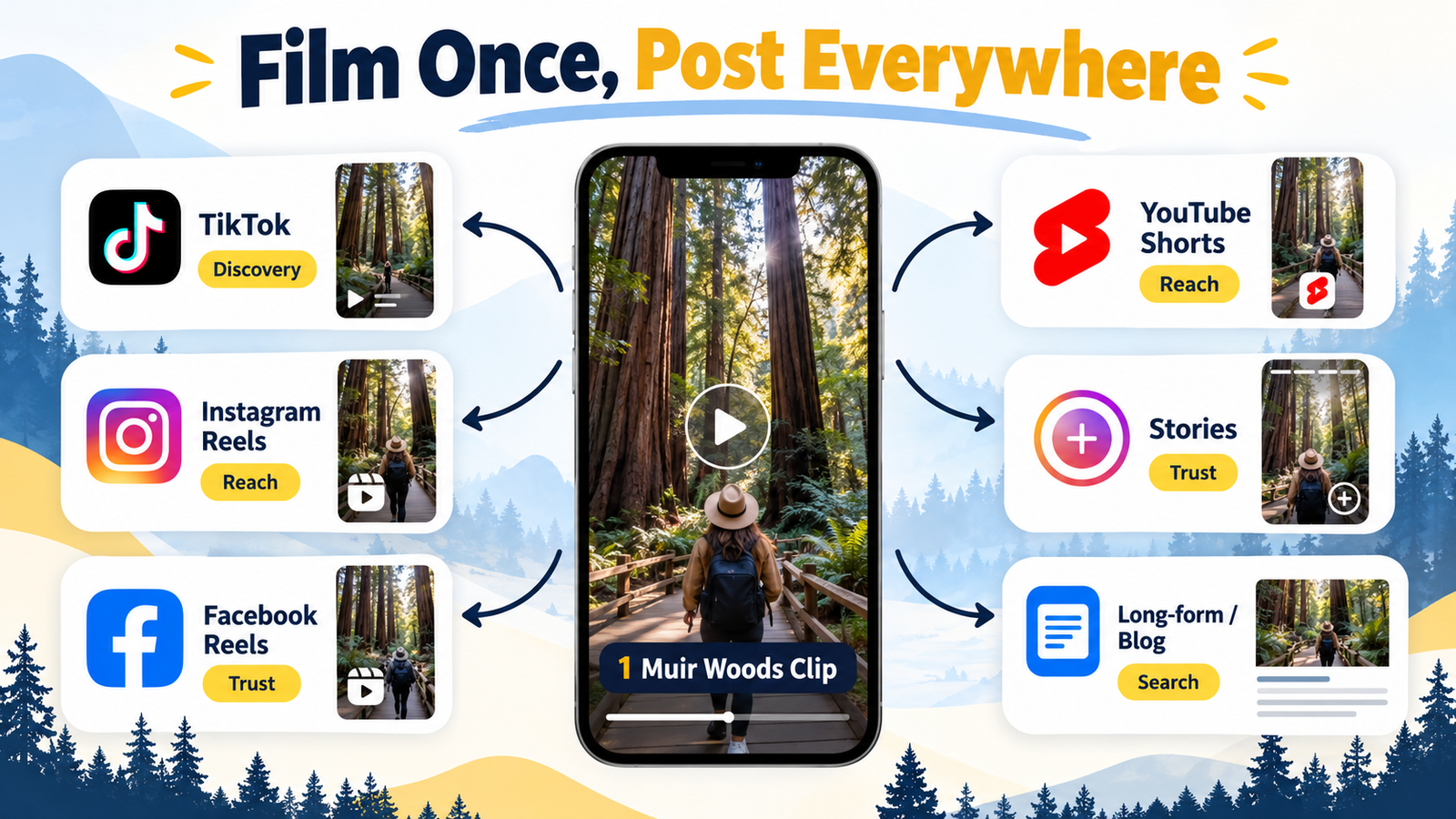
12. Film once, post everywhere
One Muir Woods clip, every platform.
One Muir Woods visit can feed every platform:
Platform
What we post
Where it leads
TikTok
“Muir Woods: 3 things to know” question video
Link in bio, pinned comment
Instagram
Same video as a Reel; a Story with a link sticker
Link in bio, Story link
Facebook
Q&A post with the full answer
Blog link in the first comment
YouTube Shorts
Same vertical video
The long Muir Woods guide
YouTube long
Part of “How to visit Muir Woods”
Link in description to the Muir Woods tour page
Google Business Profile
The Facebook Q&A post as an update, with a Muir Woods photo
“Learn more” or “Book” button to the Muir Woods page
Website
The long video embedded in the Muir Woods article
Booking on dylanstours.com
SECTION 13 · THE BALANCE
13. Content ratio across all organic content
70%Helpful local content
20%Trust and community
10%Promotion
Content type
Share
Purpose
Helpful, educational, entertaining, local
70%
Earn attention, saves, shares and trust
Social proof, guides, behind the scenes, community
20%
Build credibility and human connection
Direct promotion, booking or offer
10%
Turn interest into action
This follows the common value-first “4-1-1” rule: four educational or entertaining posts, one soft promotion, one direct promotion.
The 10% can go up for a while during
Peak travel datesMajor holidaysAn approved giveawayA new product launchThe shop opening (once the date is confirmed)Departures with low bookingsVerified last-minute availability
Even then, the heavier push goes through Stories and paid retargeting, not the feed.
SECTION 14 · THE WEEK
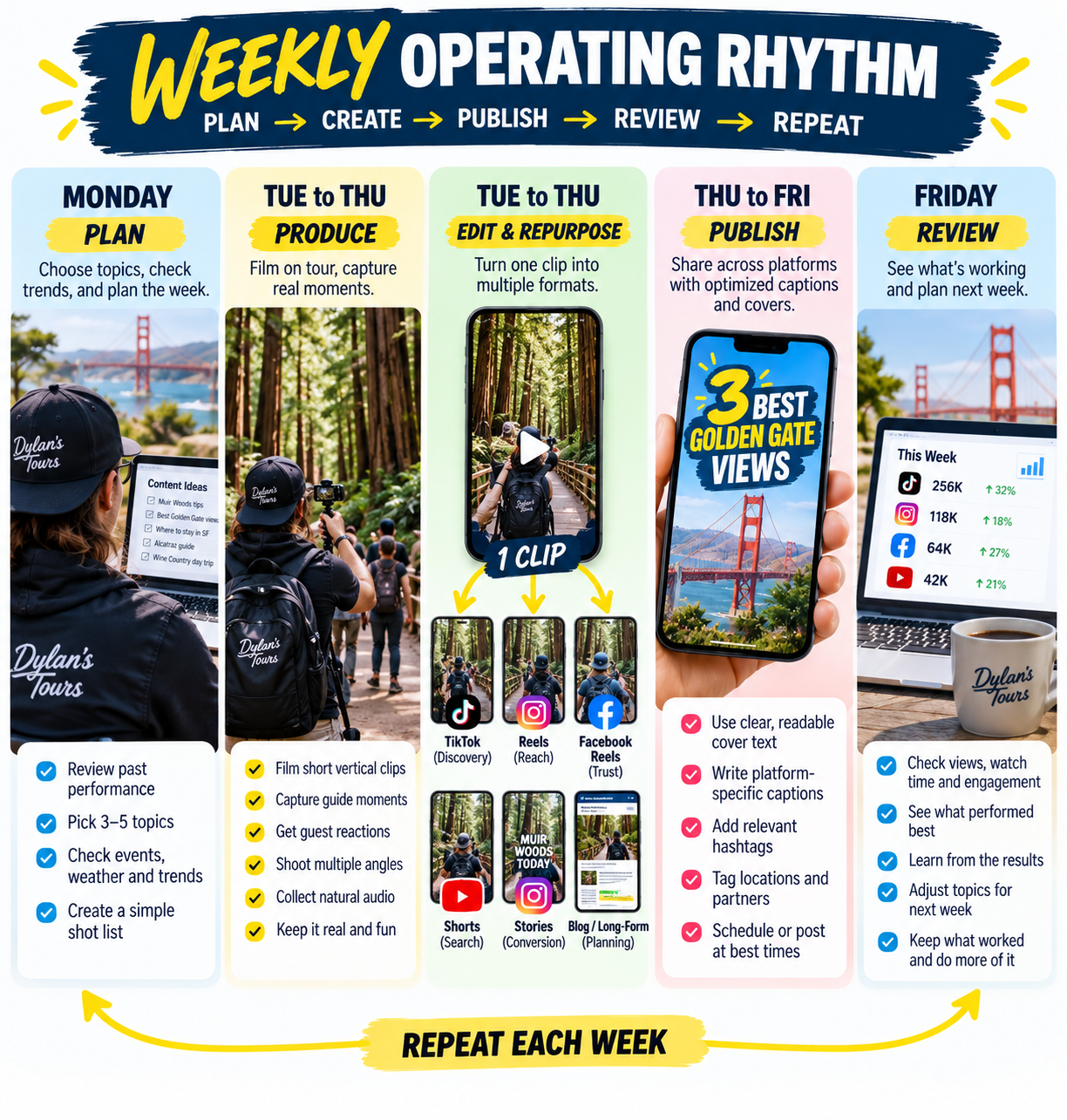
14. Weekly operating rhythm
Plan, create, publish, review, repeat.
Monday
Plan and select
Open CONTENT PIPELINE first. Fast-lane items and strong submissions get first claim on this week’s slots.
Review the next 7 to 14 days of tour capacity, seasonal events, blog and SEO priorities, shop updates, Facebook Group questions and recent top posts. Choose 3 to 4 Reels / Shorts / TikToks, 2 feed posts, daily Story themes and 1 Google Business Profile update. Log planned items in ClickUp.
Tuesday to Thursday
Produce and publish
Create question-led vertical clips. Add cover text, captions, subtitles, the place name and a soft call to action. Post the same core vertical clip across TikTok, Instagram Reels, Facebook Reels and YouTube Shorts where it fits. Publish Stories using verified current information.
Friday
Review the past week
Best Reel / TikTok by watch time, shares, saves and profile visits. Best Story by link clicks, replies and sticker engagement. Best feed post by saves, shares and meaningful comments. Booking and inquiry signals from UTM links, promo codes, DMs and “How did you hear about us?” answers. For each, decide: repurpose, improve, test with paid spend, or stop.
Send Dylan the week’s finished videos so he can confirm the direction (first few weeks).
Weekly output target for the first 30 days
First 4–6 weeks: capture first. Cris and Aaron film about 5 hours a week each, and Patrick records whenever he can. The Social Media Team produces from what comes in. Treat the targets below as goals to work toward, not fixed commitments. The calendar gets more specific once the rhythm settles.
Start with consistency; don’t set a target that forces low-quality or repetitive posts.
Channel
Starting weekly output
TikTok
3–4 videos
Instagram Reels
3–4 videos, usually repurposed from TikTok
Facebook Reels
2–3 repurposed videos
Instagram / Facebook feed
2 posts or carousels
Stories
4–6 active days
YouTube Shorts
2–3 repurposed vertical clips
YouTube long video
One strong planning video every 2–4 weeks, when we have enough useful material
Google Business Profile
1 update; aim for 3–5 new photos in active weeks with good material
Example rhythm
A sample week
This is an example rhythm, not a fixed calendar. The Social Media Team adjusts it for season, footage, performance, events and booking needs.
Reel / TikTokFeedStories
Mon
MondayReel / TikTokToday
“Fisherman’s Wharf vs. North Beach: where should you stay?”
GoalDiscovery, hotel-planning authority
Tue
TuesdayCarousel / feed postToday
“3-day San Francisco itinerary for first-time visitors”
GoalSaves, shares, support for website articles
Wed
WednesdayStory sequenceToday
Poll + question box: “Muir Woods, Alcatraz, or both?”
GoalEngagement, learning what guests ask
Thu
ThursdayReel / TikTokToday
“What Muir Woods looks like at 9 AM”
GoalInspiration, product awareness
Fri
FridayFeed social proofToday
Approved guest review with a photo of the stop
GoalTrust
Sat
SaturdayStory sequenceToday
Upcoming departures (verified), direct booking call to action
GoalConversion
Sun
SundayReel or carouselToday
“Three mistakes to avoid on your first SF trip”
GoalDiscovery, planning value
Stories: daily rhythm
3 to 7 frames on active days, not 20 random ones. Each frame should be understood in one or two seconds.
1Scenic clip
2Helpful tip or question
3Poll or quiz
4Approved review
5Relevant call to action
SECTION 15 · APPROVALS
15. Content approval matrix
What the Social Media Team can publish on its own, and what needs approval first.
Content type
Examples
Can the Social Media Team publish?
Approval needed from
Standard helpful content
Neighborhood tips, hotel comparisons, local history, guide facts, place clips
Yes if fact-checked and using approved assets
No extra approval
Social proof
Approved review quote, guest photo with permission, guide answering a question
Direct-booking perk, sale, package price, hotel pickup
No
Dylan or Joan; check with Aaron / Rhona if capacity-related
Giveaway content
$99 package, winner announcement, rules, terms
No
Dylan / Joan
New tour, product or partnership
Lombard Leap launch, Take the Plunge, new Wine Country itinerary
No
Dylan / Joan
Shop opening or address
490 Jefferson opening, hours, location
No
Dylan / Cris / Joan
Sensitive events or complaints
Safety, weather disruption, bad review response, community issue
No
Dylan / Joan / Rhona as appropriate
Paid boost or campaign
Boosting an organic Reel, creating a campaign
No
Joan + Dan / Amy
Guest-generated content not yet cleared
A guest’s photo, video or testimonial
No
Permission from the guest and the content owner before publishing
Free collab tours / creator partnerships
A free seat in exchange for an Instagram Collab post
No
Joan (seat confirmed by Aaron or Rhona)
Story Series blogs that name a tour or tour stop
Hoppers Hands and the stop at Fort Point
No
Joan, after Patrick fact-checks and Aaron confirms whether the stop is guaranteed. Dylan only for a new tour, price or claim not already on the website.
SECTION 16 · SELLING
16. Where sales should appear
Format
Level of direct selling
Sales role
TikTok
Low
Soft call to action; link in bio and a pinned comment naming the matching tour
Reels
Low to medium
Soft call to action; show the experience; top performers become paid tests
Feed post
Low to medium
Occasional launch, testimonial, or seasonal or planning-led offer
YouTube long
Low to medium
Link in the description to the matching tour or guide page
YouTube Shorts
Low
Point to the long guide or our channel
Google Business Profile
Low to medium
Useful update with a “Learn more” or “Book” button
Stories
Medium to high
Verified availability, approved offers, links, direct booking reminders
Facebook Group
Very low
Help first; recommend a Dylan’s tour only when it fits
Paid ads
High
Retarget website visitors and high-intent audiences with direct booking messages
Email
Medium to high
Personalized booking, cross-sell, repeat and referral offers
SECTION 17 · PAID
17. Organic first, paid second
Publish an organic Reel, TikTok or post.
Watch for strong signals: watch time, shares, saves, comments, profile visits.
Turn the top performer into a paid test (with Joan and Dan / Amy).
Retarget people who watched a meaningful part of the video, engaged with our Page or Instagram, visited key website pages, or started but didn’t finish a booking.
Exclude people who already booked, where possible.
Boost rule. Don’t boost a post just because it has high views. Consider paid testing only when it also shows strong watch time, saves or shares, profile visits, relevant comments, and a clear link to a bookable tour or a real planning need. A beautiful Golden Gate video may get views but not bookings; “How to visit Muir Woods without a car” may get fewer views but more bookings.
SECTION 18 · BEFORE LAUNCH
18. Tracking setup before launch
ClickUp is the campaign and task record. Drive is the asset record. Don’t use one as a substitute for the other.
Profile and link checklist
Instagram bio links to a clear dylanstours.com booking or planning page
TikTok bio has an approved direct website link
Facebook Page has the approved public address, correct phone number, an active Book Now button and a direct website link
YouTube has direct links in the channel About section, video descriptions and pinned comments
Google Business Profile links directly to the relevant dylanstours.com page
UTM convention
Everyone uses one format, so nobody invents their own:
?utm_source=[platform]
&utm_medium=organic-social     (or gbp for Google Business Profile)
&utm_campaign=[topic-or-series]
&utm_content=[video-or-post-name]
Exact tour page links are confirmed after the move from Peek to Ventrata.
SECTION 19 · FOR THE SOCIAL MEDIA TEAM
19. Content policy
Lead with useful local travel advice, visual inspiration, guides answering questions, and traveler proof.
Use Reels and TikTok for discovery and broad reach.
Use feed posts for evergreen planning value, trust and social proof.
Use Stories for interaction, timely updates, verified availability, Group growth, approved giveaways and approved direct-booking calls to action.
Keep organic content at roughly 70% value, 20% trust and community, 10% promotion.
Hard-sell only when there is a real reason: a departure with low bookings, verified limited availability, an approved giveaway deadline, a seasonal launch, or an approved special offer.
Never invent scarcity, availability, pricing, discounts, pickup details or what a tour includes.
Use original content, or content Dylan’s has permission to use.
Every promotional Story or post links to an approved dylanstours.com booking page, lead capture page, Facebook Group or DM path, never an OTA.
Follow the content approval matrix (Section 15) and the Brand DNA Guide.
Record each campaign or offer in ClickUp with the product, audience, call to action, date, owner and result.
SECTION 20 · RESULTS
20. What to measure
Don’t judge content by likes alone.
Goal
Better metrics
Discovery
Reel and TikTok reach, non-follower reach, watch time, shares, profile visits
Authority
Saves, shares, meaningful comments, Facebook Group joins, guide downloads
Trust
Engagement on review posts, DMs, repeat viewers
Conversion
Story link clicks, booking-page visits, promo code use, tracked direct bookings
Learning
Questions asked, common objections, best-performing places, tours and topics
Content production
Usable new assets added to the library; number of tour guide and team contributors each month
Content reuse
Assets reused across several channels; top-performing places and topics reused in new content
Try every format rather than relying on just one, and let these numbers show what works.






Social Team SOP
Playbook for the Social Media Team | In order of importance. Sections 1 and 6 apply to every single post. Our primary mandate is turning raw guide footage into qualified website sessions and direct checkout bookings on
dylanstours.com.1. The #1 rule: does this answer a guest’s question, or show a place worth seeing?
Most of our guests visit San Francisco once, maybe twice in a lifetime. We are not building repeat customers. We are reaching people while they plan that one trip, and planning a trip means asking questions: Where do I park? Is it worth it? How much time do I need? What's it really like?
A post that answers one of those questions gets found, saved and shared. When that person is ready to book, they book with whoever helped them. A sales post answers nothing and gets scrolled past. This is the most common mistake social media managers and business owners make: selling in the post. Our posts answer the question. The selling happens quietly through the funnel (the comment link, bio link or Story sticker), never in the post itself.
The 2-Question Test (Every post must pass both):
Answer posts in practice
Section 1 Execution Rules:
2. What goes on each platform
Two content styles: experience-first question and answer (a real traveler question, answered from the tour, no hard sell) and destination or vibe clips (one place, its name on screen, no talking needed).
Platform by platform
dylanstours.com, never Viator or GetYourGuide.3. Funnels: how each post leads to our website or a booking
Every post has one next step and one place it sends people. These are the paths we use:
Photo Collage to Website Article
Photo collage with a title, a one-line caption ("Full list in the comments"), then the first comment links to a full article on dylanstours.com. Each click sends visitors to our site and helps it rank on Google. Best on: Facebook.
View Live Post Reference (Facebook) ↗Answers in the Comments
A photo collage asks a traveler question ("Where to park for the Golden Gate Bridge?"). The caption says "Answers below". Each answer is its own numbered comment. Comments push the post to more people. Best on: Facebook, Instagram.
View Live Post Reference (Facebook) ↗Question, List in Comments, Then a Link
Collage or text card asks the question, numbered comments answer it, and the last comment links to the matching blog post or tour page ("Want us to drive you there? Book the Half Day tour: link"). Best on: Facebook.
View Live Post Reference (Facebook) ↗Frictionless One-Click Conversion
Video or photo with a short caption and the link right in it ("Experience Muir Woods with us: link"). Simplest path, one tap. Best on: Facebook and YouTube descriptions. Not TikTok or Instagram captions, where links can't be clicked.
View Live Post Reference (Facebook) ↗More Funnels:
dylanstours.com(or our own blog), never Viator or GetYourGuide; and each link is tagged with the platform and post name (for example?utm_source=facebook&utm_medium=organic-social&utm_campaign=muir-woods-parking&utm_content=[post-name]) so we can see which posts bring visits and bookings. A blog funnel only goes live once the article is published on our site.4. Saving footage
Tour guides upload to the Drive folder (
90_RAW UPLOADS) or post in the WhatsApp group. Every work day, the Social Media Team checks both and moves useful originals into the correct 01–24 folder; finished edits go in its Final Edit subfolder.5. How a post moves through the Hub
Only approved posts go on the CALENDAR.
6. Before anything is posted (checklist)
The Social Media Team must verify all 9 items before scheduling or publishing:
7. Ideas from what our tour guides have already shared
Who to ask